.png&w=1280&q=75)
You know the feeling: everyone’s streaming in 4K, your kid jumps into a VR session, and your video call freezes right when you’re trying to impress your boss. I remember swapping my decade-old router for the Archer BE6500 after a particularly disastrous movie night — suddenly, buffering was gone and every device behaved. This post walks you through why that upgrade might make sense for you, what to expect during setup, and the small gotchas people miss.
Why Wi‑Fi 7 Matters: Speed, Range, and Real-world Wins
6.5 Gbps Dual-Band WiFi 7 speed built for 4K/8K Streaming
When your home is full of screens, smart devices, and game consoles, older Wi‑Fi can feel “fine” until it suddenly isn’t. With Wi‑Fi 7 Technology, the TP-Link Archer BE6500 (Archer BE400) gives you a big jump in headroom: a 6.5 Gbps Dual-Band WiFi 7 total (theoretical) speed, split as 5764 Mbps on 5 GHz plus 688 Mbps on 2.4 GHz. That extra capacity is what helps you stream 4K/8K Streaming content smoothly while someone else downloads a huge update and another person jumps into a VR/AR session.
Lower latency with MLO + Multi-RUs (real-time apps stay smooth)
Speed is only half the story—latency is what you feel in competitive gaming, video calls, and cloud apps. Wi‑Fi 7’s Multi-Link Operation (MLO) can move your traffic more intelligently, helping reduce lag when your network gets busy. Add Multi-RUs and 4K‑QAM, and you get more efficient data handling, so your PS5 Pro matches, Zoom calls, and game streaming stay responsive even with lots of devices active.
6× External Antennas + Beamforming Technology for better whole-home coverage
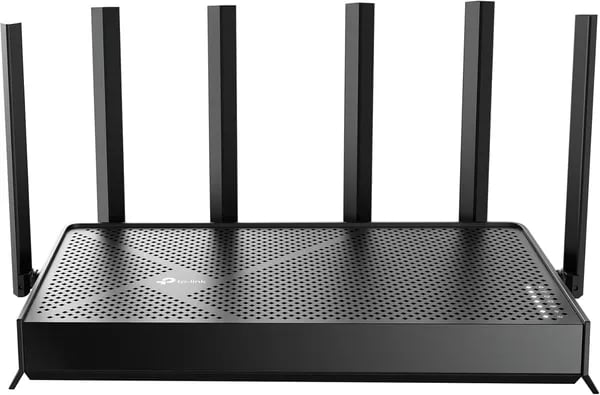
Coverage matters just as much as raw speed. The Archer BE6500 uses 6× External Antennas and Beamforming Technology (plus MU‑MIMO and OFDMA) to push a stronger, more consistent signal where you actually use it—helping you reach up to 2,400 sq. ft. and connect up to 90 devices without constant dropouts.
| What you get | Why it matters |
|---|---|
| 5 GHz: 5764 Mbps (4x4 streams) | Fast lanes for gaming, work, and 4K/8K streaming |
| 2.4 GHz: 688 Mbps | Steadier reach for smart home and longer-range devices |
| Up to 832 MB/s wireless throughput (5 GHz) | Better performance for heavy local transfers and busy networks |
Ricardo Centeno: "Setup was a breeze and the speed jump was noticeable right away — perfect for streaming and gaming."
Set It Up Like a Pro: Tether App, Mesh, and Practical Tips
Tether App setup: fast, guided, and beginner-friendly
Getting your Archer BE6500 online is mostly a “follow the prompts” job. Download the TP-Link Tether app on Android or iOS, plug in the router, and let the app walk you through naming your Wi‑Fi, setting a strong password, and updating firmware. Reviewers often say it’s straightforward even if it’s your first router upgrade.
Alex Moore, Network Engineer: "The Tether app removes the guesswork — even non-technical users can set up a mesh-ready network in minutes."
Inside the app, you can quickly create a Guest network for visitors and a separate IoT network for smart devices. You can also block unknown users, set parental controls, and turn on QoS to prioritize gaming, video calls, or streaming when your network gets busy.
EasyMesh Compatibility: expand coverage with BE3200 extenders
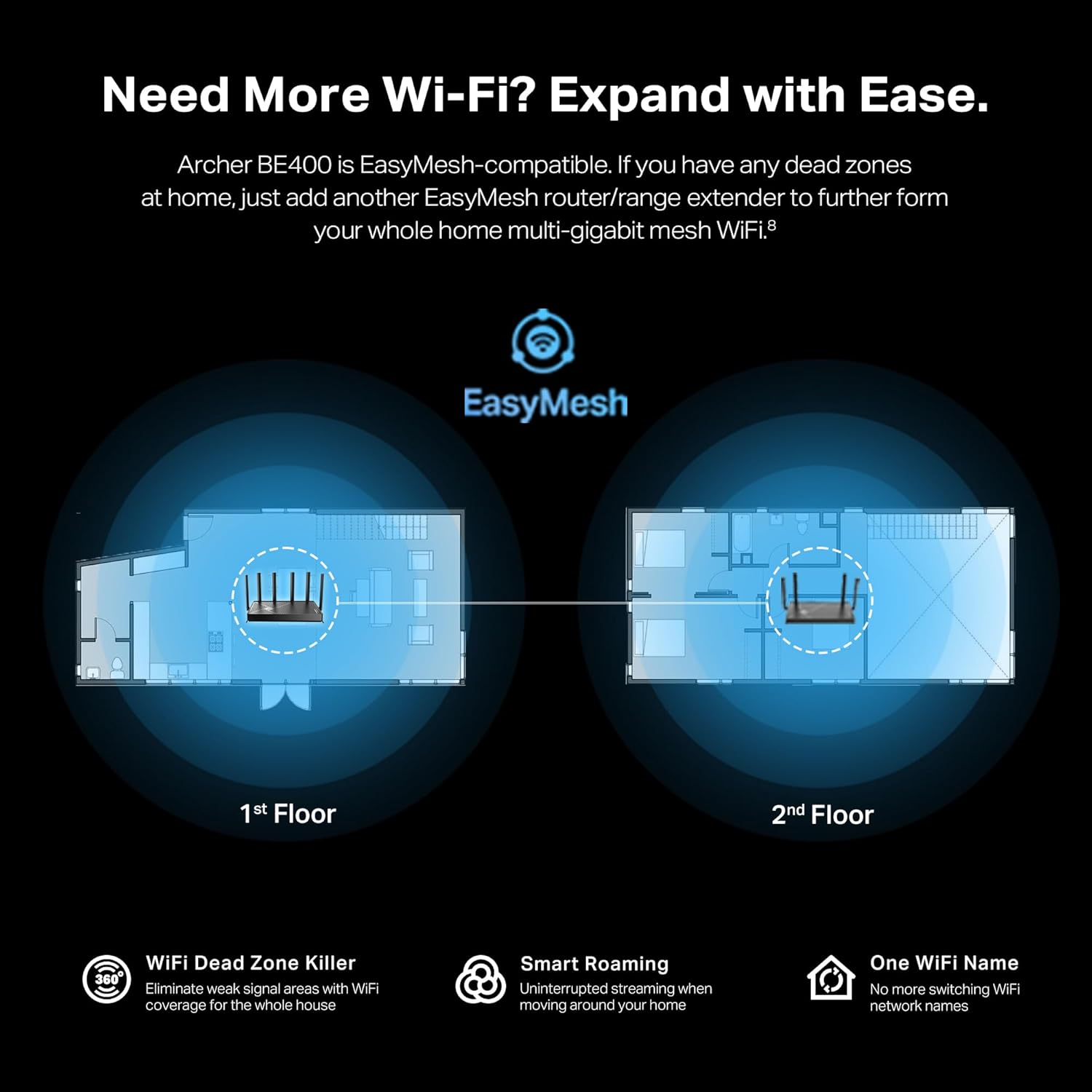
The Archer BE6500 supports EasyMesh Compatibility, so you can grow into a whole-home mesh without replacing your router. If you have dead zones, add a compatible extender like the BE3200 (including the RE223BE) and pair it through the Tether app. You’ll get smoother roaming as you move room to room—no more manually switching networks.
- Place the extender halfway between the router and the weak-signal area.
- Keep it in the open (not inside cabinets) for better backhaul stability.
- Use the same SSID for seamless roaming across the mesh.
2.5G Wired Connection + USB 3.0 Port: quick wins for performance
For the most stable speed, use a 2.5G Wired Connection for your main PC, console, or NAS—especially if you have multi-gig internet or local file transfers. The router also includes a USB 3.0 Port for simple network storage or sharing files across your home (device compatibility can vary, so test your setup early).
Practical checks before you mount it and forget it
- Plug type: The box includes a US plug. If you’re in the UK/EU, pack an adapter.
- Wi‑Fi 7 features: To benefit from MLO and WPA3, your phone/laptop must support them.
- Value timing: At $119.99 (about 33% off $179.99), it’s a strong buy—plus Prime shipping and the 2025 holiday return policy can reduce risk.
Security, Remote Work, and Firmware: What Keeps Your Network Safe
HomeShield security + WPA3: Everyday protection you can control
When you upgrade to the TP-Link Archer BE6500 (Archer BE400), you’re not just getting faster Wi‑Fi 7—you’re getting smarter protection built in. HomeShield security adds layered monitoring and device control, which is especially helpful when your network is packed with work laptops, phones, smart TVs, and IoT gear.
HomeShield includes a real-time network scanner to help spot risks early, plus parental controls and QoS prioritization so your video calls and uploads don’t get crushed by gaming or streaming. You can use core features for free, and move to subscription tiers if you want extra tools and deeper reporting.
- WPA3 support for stronger encryption on newer devices
- Guest and IoT network options to separate “trusted” devices from everything else
- Granular device controls so you can pause, block, or prioritize specific users
Note: older devices can still connect, but they won’t benefit from the full WPA3 security layer.
VPN Supported: Secure remote work without extra hardware
If you work from home (or travel), the router’s VPN Supported features matter. With VPN Client and Server support, you can securely access home resources (like a NAS or shared drive) or protect your browsing on untrusted networks. The best part: you can run VPN traffic while other devices keep using normal internet traffic, so your whole household doesn’t have to “slow down” just because you’re connected to a work VPN.
Ricardo Centeno: "Knowing the router auto-updates and has VPN support gave me peace of mind when working from home."
Secure-by-Design + Automatic firmware updates: Stay patched
TP-Link’s Secure-by-Design approach—recognized by CISA—focuses on reducing risk over time, not just on day one. That’s where Automatic firmware updates help: the Archer BE400 can receive automatic cloud firmware updates to patch security issues and keep features current with less effort from you.
| Security Feature | What you get |
|---|---|
| Encryption | WPA3 supported |
| Protection | HomeShield security real-time scanner, IoT monitoring, device controls |
| Controls | Parental controls + QoS prioritization |
| Remote access | VPN Supported (Client + Server) |
| Maintenance | Automatic firmware updates via cloud |
Real Users, Real Rooms: Global Feedback and Practical Caveats
User Reviews: Why the Archer BE6500 Feels “Fast” in Daily Life
Specs are nice, but User Reviews tell you what happens in real homes. Across U.S. listings, the Archer BE6500 sits around ~4.4 stars, with 4,000+ units sold reported through Amazon channels—an important signal that reliability holds up beyond a few early buyers. People commonly mention smoother Online Gaming sessions (less lag spikes), faster downloads, and steadier 4K/8K Streaming even when multiple devices are active.
Feedback isn’t just U.S.-based. Shoppers in Mexico and Brazil often describe “full-house” coverage that matches the router’s claim of up to 2,400 sq. ft., plus enough capacity for busy homes (up to 90 devices)—especially helpful if you’ve got phones, TVs, consoles, and smart home gear all competing for airtime.
Ricardo Centeno: "If you want a dependable everyday router that stepped up for gaming and streaming, this one did the trick for our household."
Practical Caveats: Wi‑Fi 7 Gains Depend on Your Devices
To unlock the “wow” features of Wi‑Fi 7 (like MLO, 4K‑QAM, and stronger WPA3 options), your client devices must support them. If your laptop, phone, or console is still Wi‑Fi 6/6E, you can still see better coverage and stability—but don’t expect full Wi‑Fi 7 peak behavior everywhere.
- Speed varies with your ISP plan, walls/floors, and interference.
- Placement matters—a central spot usually beats hiding it in a cabinet.
USB 3.0 Port Sharing: One Known Quirk (and a Workaround)
The USB 3.0 Port is great for basic network storage, but some users report USB file sharing limits on Chromebox. A common workaround is using FTP access instead:
ftp://<router-ip>
Buying Notes: Plug Type, Support, and Confidence Signals
If you’re outside the U.S., note the router may ship with a US plug, so you might need an adapter. On the upside, support experiences are often praised, and the current pricing (about $119.99 vs $179.99 original; lows near $98.68 used/new) plus the Amazon’s Choice badge can make the purchase feel lower-risk.
Wildcard: If Your Router Could Tell a Story
Wi-Fi 7 Technology, told like a busy café
Picture the Archer BE6500 as the barista in a packed café. Every device in your home is an order: your phone wants a quick espresso, your TV wants a steady pour for 4K streaming, and your console wants a “no-wait” pickup for gaming. With Wi-Fi 7 Technology, the router doesn’t just take orders in a line—it can juggle them. Features like MLO feel like the barista using two hands at once, sending your data down the best path so your video call doesn’t stutter when someone else starts a download. And QoS is the quiet decision to serve the “time-sensitive” drinks first, so latency stays low when it matters.
The night you set it up, and the morning everything finally works
Now imagine a small, real moment: you install the Archer BE6500 one evening, using the Tether app, and you don’t expect much beyond “faster Wi‑Fi.” Then you wake up and your smart home stops acting moody. The doorbell camera loads on the first try. The lights respond without that awkward pause. Netflix doesn’t drop quality when someone walks into the kitchen with their phone. It’s not magic—it’s the router doing the boring work: balancing devices, aiming signal with beamforming, and quietly “mopping up spills” with automatic security updates and WPA3 protection.
Alex Moore, Network Engineer: "Think of new routers as an investment: small upfront cost, big cut in daily friction if you pick the right one."
EasyMesh Compatibility: a small-office “almost enterprise” what-if
Here’s a quick hypothetical: you place two BE6500 units in a small office and expand with EasyMesh Compatibility (like an EasyMesh extender) so the back room gets the same strong signal as the front desk. Suddenly, shared files move faster, calls sound cleaner, and guests stay on a separate network without drama. Just remember: if your office needs specific IP plans or VLAN rules, check those requirements before you assume “plug-and-play” covers everything.
One last practical note before you hit “buy”: to get the full Wi‑Fi 7 benefits, your phones, laptops, and consoles need Wi‑Fi 7 support too. Even so, the Archer BE6500 can still be the upgrade you feel every day—less waiting, fewer dropouts, and a home network that finally behaves.



