.png&w=1280&q=75)
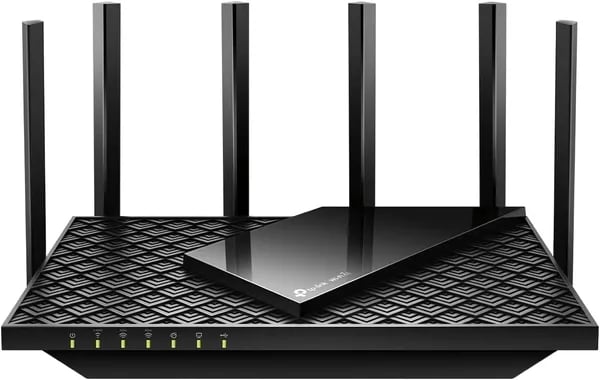
You probably remember the last time your router felt ancient: dropped Zoom calls, stuttering streams, or a fatal lag in a clutch game. I bought an Archer AXE75 for a small home office and—spoiler—its 6 GHz band changed that weekend. This outline walks you through what matters: real speeds, quirks, costs, and whether the subscription bait is worth it.
Why upgrade to Wi‑Fi 6E now (and what the 6 GHz band really gives you)
If your Wi‑Fi feels “fine” until everyone starts streaming, gaming, and jumping on video calls at the same time, that’s exactly why WiFi 6E support matters. The Archer AXE75 adds a brand-new lane to your network: the 6 GHz band. In real homes, that usually means less congestion, lower latency, and fewer random slowdowns—especially for modern devices that can actually use 6E.
The 6 GHz band: less crowding, smoother latency
Most homes are packed onto 2.4 GHz and 5 GHz. Neighbors, smart gadgets, and older routers all compete for the same airspace. The 6 GHz band is different: it’s newer, cleaner, and typically far less crowded right now. That’s why it can feel “snappier” for gaming, video calls, and cloud apps—latency drops because your device isn’t constantly waiting its turn.
The AXE75 also supports 160MHz channel width, which can deliver a big speed jump for compatible 6E clients. Just remember: peak “up to” speeds depend on your device, distance, walls, and local interference.
AXE5400 tri-band speeds vs typical Wi‑Fi 5 routers
The Archer’s AXE5400 specification is rated at up to 5400 Mbps across three bands (2.4 GHz + 5 GHz + 6 GHz). Compared to many Wi‑Fi 5 routers that juggle everything on two bands, tri-band can be a practical upgrade because you can push newer devices onto 6 GHz and leave 5 GHz for everyone else.
- Multiple 4K streams: Tri-band capacity helps when you’re running two or three 4K streams while someone games.
- Lower lag gaming: Cleaner spectrum + OFDMA can reduce spikes when the network is busy.
- Better device handling: OFDMA and beamforming help keep dozens of devices stable.
A quick real-world moment: 6 GHz fixed my audio lag
During a remote rehearsal, I connected a wireless headset over 6 GHz instead of 5 GHz. The annoying audio delay disappeared—no tweaks, no “turn it off and on,” just a cleaner connection that stayed consistent even while other devices were streaming.
Dong Ngo: "The AXE75 delivers excellent close-range speed and brings Wi‑Fi 6E to a realistic price point."
Performance analysis: real-world speeds, NAS and device handling
Archer AXE75 performance: throughput and speeds you’ll actually feel
On paper, the AXE75 promises huge tri-band numbers, but what matters is how it behaves in your rooms. In close-range testing (same room, strong signal), you can expect ~535–559 Mbps throughput—fast enough that gaming, 4K streaming, and big downloads feel instant when you’re near the router. This “excellent close-range throughput” is where the Archer AXE75 performance really shines, especially if your phone or laptop supports WiFi 6E and wider channels.
Move upstairs or put a couple of walls in the way, and the story changes. Real-world results show a noticeable drop to around ~244 Mbps in tougher spots. That’s still plenty for streaming and video calls, but it proves one thing: placement matters. If you want the best throughput and speeds across the whole home, put the router high and open, or plan on adding OneMesh nodes for the rooms that get hit hardest.
| Scenario | Example throughput |
|---|---|
| Close range (same room) | ~535–559 Mbps |
| Upstairs / behind walls | ~244 Mbps |
NAS performance and USB 3.0 sharing (good for casual storage)
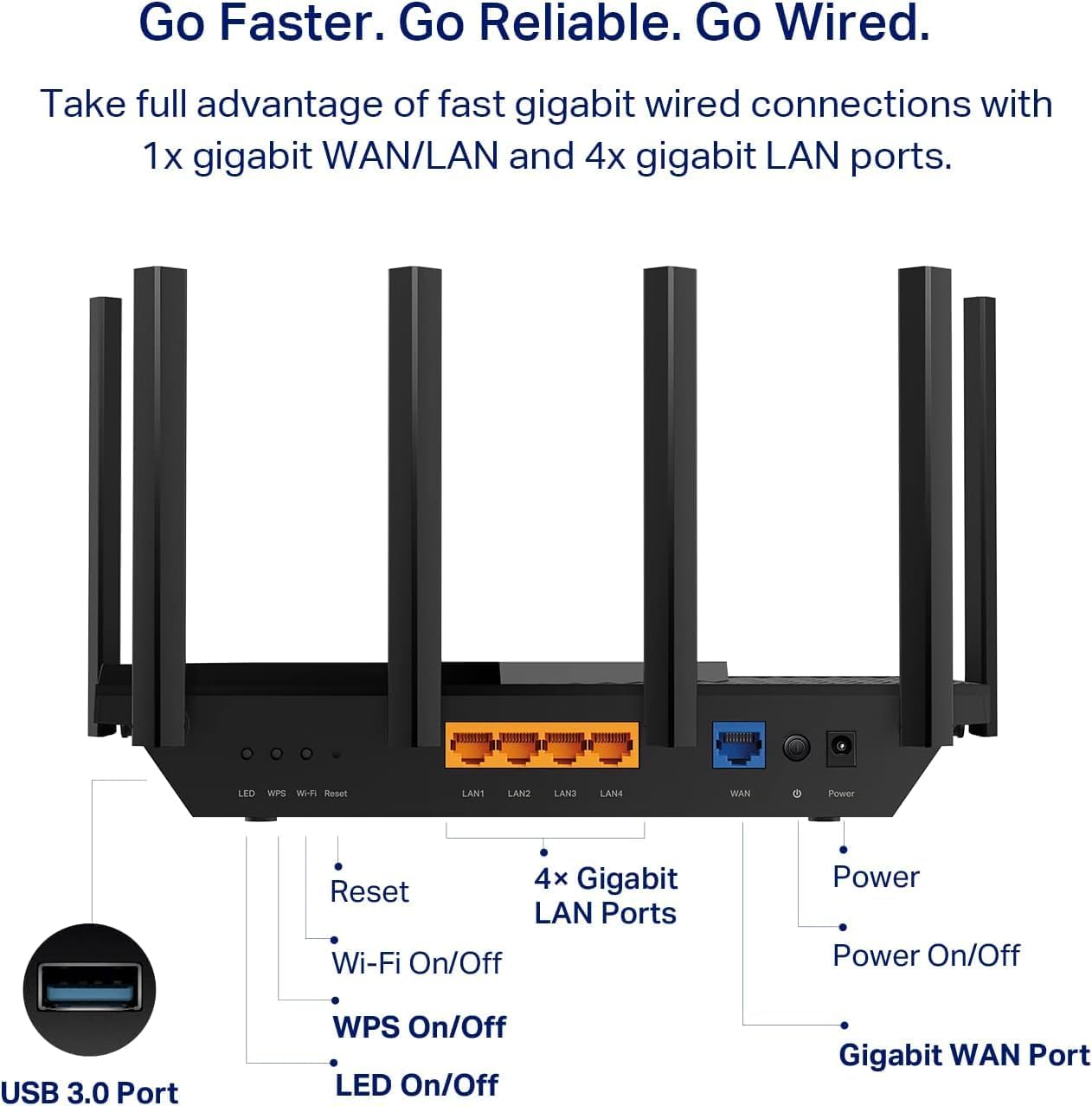
The USB port is handy for USB 3.0 sharing—think quick backups, sharing a media folder, or light “router NAS” use. With a decent drive, NAS performance can land around ~100 MB/s reads and ~50 MB/s writes over Gigabit, which is solid for casual file access. Just don’t expect it to replace a dedicated NAS for heavy multi-user editing or constant large writes.
One caveat: some owners report OS-specific quirks, especially with Windows 11 file sharing. If you hit weird permissions or discovery issues, you may need to tweak SMB settings or map the share manually.
Device capacity: 30+ devices without the network feeling “stuck”
The 1.7 GHz Quad-Core CPU plus OFDMA helps the AXE75 stay responsive when your home is busy. In real households, device capacity 30+ devices is realistic—phones, TVs, consoles, cameras, and smart speakers all at once.
Stephen W.: "Setup was a breeze and the speeds were solid across multiple devices — the quad-core really shows in everyday use."
Coverage, OneMesh expansion and setup: from spare bedroom to full-house WiFi
Coverage and range: what you can realistically expect
In a typical mid-sized home, the Archer AXE75 delivers solid coverage and range—often around ~2,000 ft² in common home tests. That’s usually enough to cover a main floor plus a few extra rooms, as long as your devices aren’t all hiding behind thick walls or tucked upstairs at the far end of the house.
Keep in mind that distance and obstacles matter more than specs. The 6 GHz band is fast and clean, but it drops off quicker through walls than 5 GHz. And 5 GHz, while better at range than 6 GHz, can still take a big hit when you add floors, brick, or dense insulation. Some real-world tests show steep throughput drops once you move far from the router or add multiple walls.
Beamforming antennas and placement tips (this matters)
The AXE75 uses beamforming antennas to aim signal toward your devices instead of spraying WiFi everywhere equally. It helps with stability, but it can’t break physics—bad placement will still limit performance.
- Place it central and high (a shelf beats the floor).
- Avoid hiding it in a cabinet or behind a TV.
- If you want 6 GHz benefits, keep 6E devices relatively near the router and on the same floor when possible.
- For multi-story homes, try positioning it near the stairwell to help signal travel upward.
OneMesh support: the easiest path to whole-home WiFi
If you already own TP-Link extenders, OneMesh support is the practical upgrade path. You pair a compatible TP-Link range extender, and your network becomes a simple mesh-style setup with seamless roaming—so you can walk from your office to the kitchen without manually switching networks.
- Set up the AXE75 in the TP-Link Tether app.
- Add a OneMesh-compatible extender and enable OneMesh.
- Place the extender halfway between the router and the weak zone (not inside the dead zone).
FredSaw: "Paired with a TP‑Link extender, rooms that were dead spots now stream 4K without hiccups."
That said, a few users report wall penetration that’s less impressive than expected—especially upstairs—so if your home has tough materials, plan on OneMesh expansion rather than hoping one router will do it all.
Security & parental controls: HomeShield’s freebies vs. paid extras
The Archer AXE75 leans on TP-Link HomeShield for security and family features. Out of the box, you get solid basics plus WPA3 security for modern device encryption—enough for many homes that just want safer Wi‑Fi without extra setup.
What you get for free with TP-Link HomeShield Basic
HomeShield’s Basic Plan is bundled at no extra charge, and it covers the essentials you’ll actually use day to day:
- Network scanning to flag obvious risks and weak settings
- Device identification so you can see what’s connected (helpful in smart-home heavy houses)
- Basic parental controls for simple filtering and household management
If your goal is “keep strangers out, keep tabs on devices, and apply light rules for kids,” the free tier is adequate—and it matches what many people expect from a modern router.
What’s locked behind the subscription (and why it matters)
Where things get tricky is the jump to paid features. Many of the protections people assume are standard are part of the subscription, including:
- Online antivirus style protections
- Parental controls premium options (more detailed controls and reporting)
- Firewall enhancements
- DDoS prevention
- Spam blocking
This is why the subscription model becomes part of your total cost of ownership. If you’re a power user—or you’re managing a busy household with lots of devices—you may end up budgeting for the paid tier to get the “full” security package.
Why reviewers call it “nickel-and-dime”
The frustration isn’t that HomeShield exists—it’s that TP-Link used to include more protections for free on older models like the AX11000. That shift is a sticking point in reviews, especially when many competing routers bundle broader security without ongoing fees.
Mercy: “I like the router’s speed, but having to pay for protections I expected to be standard feels annoying.”
Also worth noting: some HomeShield features can require a cloud login, which can affect how you feel about privacy—even if the router’s local performance is excellent.
Price, buying tips, and our verdict — is the Archer AXE75 right for you?
An affordable price under $200 that’s hard to ignore
In 2025, WiFi 6E still isn’t “cheap,” which is why the Archer AXE75 router stands out when it drops to sale pricing. On Amazon, new units are listed at $116 (about 42% off the $199.99 list price), and used options start around $67.60. That makes it a genuinely affordable Wi‑Fi 6E upgrade for most homes—especially if you want the 6 GHz band without paying premium-router money.
Buying tips: low-risk purchase, strong seller protections
If you’re buying through Amazon, it’s typically Prime eligible with free shipping, and the extended holiday policy is a big plus: free returns/replacements until January 31, 2026 for 2025 holiday purchases. That flexibility matters because real-world WiFi can be unpredictable in your space, and it gives you time to test coverage, device compatibility, and whether 6E actually benefits your setup.
Confidence is also boosted by its marketplace performance: it ranks around #683 in Electronics and #2 in Computer Routers, with a 4.3-star average across 5,000+ reviews. You also get a TP‑Link 2-year warranty and 24/7 technical support, which is reassuring if you’re not a networking expert.
Our verdict: who should (and shouldn’t) buy it
You should choose the AXE75 if you want strong close-range speed, smoother multi-device handling, and easy expansion via OneMesh—all at an affordable price under $200 when on sale. It’s a smart “future-proof” pick if you already own (or plan to buy) WiFi 6E devices.
Skip it if you need a fast wired backbone. The multi-gig port absence is the AXE75’s biggest limitation, since a 1GbE WAN/LAN can bottleneck high-end internet plans, NAS transfers, or wide-channel wireless performance. Also, if you expect advanced security features to be free, HomeShield’s paid tiers may feel like an ongoing cost.
TechGearLab: "For the price, the AXE75 is a compelling budget Wi‑Fi 6E option if you don’t need a multi‑gig port."



