.png&w=1280&q=75)
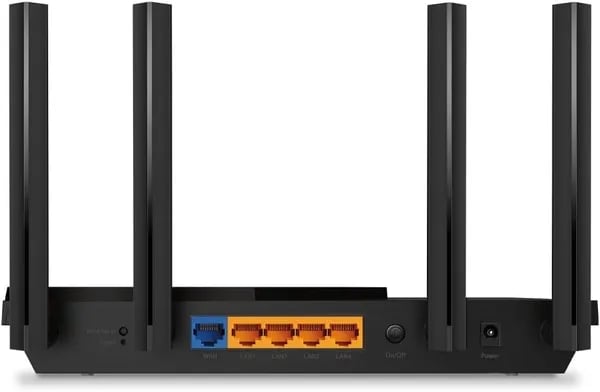
You know that sinking feeling when your smart speaker pauses mid-song or your video call pixelates? I swapped my ISP router for the TP‑Link Archer AX21 and suddenly the house stopped arguing over bandwidth. In this small, honest guide you'll get hands-on notes (and a few weird home-networking confessions) so you can decide if the AX1800 is the practical upgrade your life actually needs.
Explore the New Era: AX1800 Dual‑Band Wi‑Fi 6
What “AX1800 Wi‑Fi 6” really means (and what it doesn’t)
The Archer AX21 is marketed as AX1800 Wi‑Fi 6, which is a simple way of saying you get Dual-Band Wi‑Fi 6 Up to 1.8 Gbps in combined, theoretical bandwidth. It’s split across two bands:
| Band | Theoretical max | Best for |
|---|---|---|
| 5 GHz | 1200 Mbps | Fast streaming, gaming, newer devices |
| 2.4 GHz | 574 Mbps | Longer range, smart home gear, older devices |
| Combined | 1.8 Gbps speeds | Total capacity across both bands |
Two quick reality checks: the AX21 is not Wi‑Fi 6E (so there’s no 6 GHz band), and in crowded areas it may also lack DFS channels, which can limit your “clean channel” options if nearby networks are noisy.
Wi‑Fi 6 features that matter in a busy home
Wi‑Fi 6 isn’t just about raw speed—it’s about keeping your network smooth when everything is connected at once.
- OFDMA technology: Think of it like the router delivering data to multiple devices in one trip instead of making separate trips. This reduces waiting and helps when you’ve got phones, TVs, consoles, and smart speakers online together.
- Target Wake Time: Your Wi‑Fi 6 devices can “schedule” check-ins with the router, which cuts down on constant chatter. That can improve efficiency and may help battery-powered devices last longer.
- Beamforming: The AX21 can focus signal toward your devices, helping coverage feel steadier across rooms.
Michael: “Setup was a breeze and the connection headaches vanished — multi‑room playback finally works.”
Real-world expectations vs. the 1.8 Gbps headline
The 1.8 Gbps speeds number is a combined, lab-style maximum—not what you’ll see on a single phone or laptop. Real homes have walls, interference, older devices, and internet plans that cap speed anyway. What you typically feel is better consistency: fewer slowdowns, less congestion, and more stable performance when multiple devices are active.
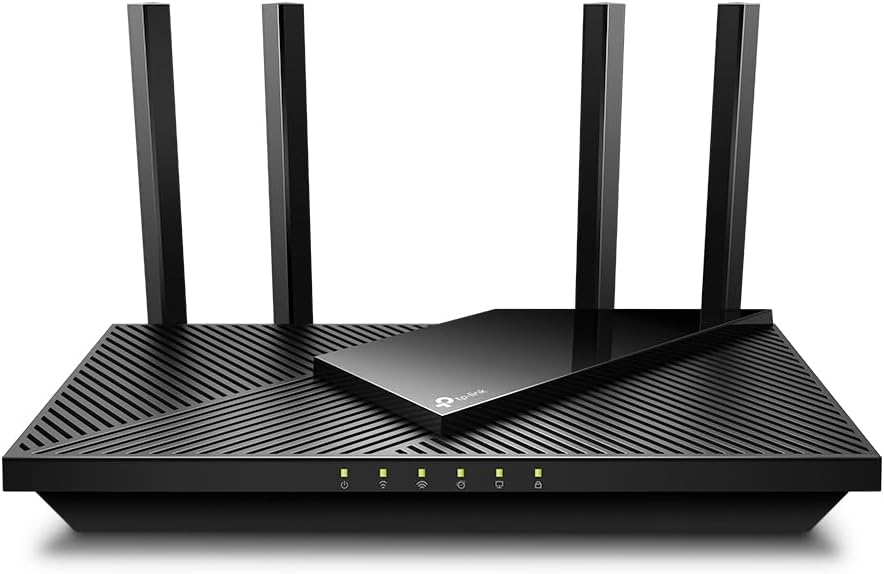
Extensive Wi‑Fi Coverage & Hardware Realities
Four antennas + Beamforming technology = stronger, steadier reach
If your current router struggles to push signal past one room, the Archer AX21 is built to feel like a real upgrade. It uses Four antennas that are also High‑gain antennas, plus Beamforming technology to aim Wi‑Fi toward your devices instead of spraying it everywhere. In real life, that usually means fewer dead zones, better speeds at the edges of your home, and more stable connections for streaming, gaming, and smart home gear.
TP-Link’s marketing and many reviews put its Extensive Wi‑Fi Coverage at up to 3000 sq ft. That’s a solid match for most apartments, condos, and many single-story homes—especially if the router is placed in a central, open spot.
Front-End Module (FEM) power: what it changes in a loft vs. a 2-story house
Along with beamforming, the AX21 uses a high-power Front-End Module (FEM) to help push and hold signal. Here’s what that tends to mean:
- Open loft / open floor plan: signal travels cleanly, so you’ll often see wide, even coverage.
- Two-story homes: floors, HVAC, and dense walls can weaken Wi‑Fi. You may still get good whole-home coverage, but the far upstairs corner (or a garage) is where you’ll notice limits first.
As RTINGS’ David Harris notes:
“The AX21 recovers quickly when the internet drops and delivers broad coverage for most homes.”
OneMesh support: expand later without replacing your router
If you find a patchy bedroom or back patio, OneMesh support lets you add compatible TP-Link extenders and create a mesh-like setup with one network name. A common, budget-friendly add-on is the TP-Link AC1200 Wi‑Fi Extender.
Accessories that make coverage feel “finished”
- TP-Link AC1200 extender: best for stubborn dead zones.
- DbillionDa Cat8 Ethernet Cable: great for wired devices (PC/console/TV) or a wired backhaul to an extender when possible.
Connect More, Stay Fast: Control, Security & Smart‑Home Wins
Split SSIDs, Guest Networks, and “Hidden” Wi‑Fi (Finally, You’re in Charge)
One of the biggest reasons you’ll love the Archer AX21 is the control you don’t get from many ISP routers. Instead of letting your router “guess” where devices should go, you can split 2.4GHz and 5GHz into separate SSIDs. That means your smart speakers, plugs, and older devices can stay on 2.4GHz, while your phones, TVs, and consoles can live on 5GHz for better speed.
You also get easy guest networks (so visitors don’t touch your main devices) and the option to hide networks to reduce casual neighbor snooping. This is a simple way to Connect More, Stay Fast—especially in busy homes with lots of devices.
Smart‑Home Win: No More Band‑Steering Breaks (Echo Dots Included)
If you’ve dealt with Spectrum’s band‑steering quirks, you know the pain: devices get pushed between bands, and features can break. With the AX21, keeping devices on the right SSID can stop those random dropouts that ruin routines and audio groups.
Michael: "After switching to the AX21, my Alexa multi‑room audio stopped dropping — that alone was worth the upgrade."
In real use, this kind of stability shows up everywhere—multi‑room Alexa stereo stays locked in, streams buffer less, and your network feels “calm” even when everyone’s online.
WPA3 Security + OpenVPN Server: Strong Protection Without the Headache
The AX21 brings a security toolkit that’s practical for home users, not just IT pros. You get WPA3 security support, plus built-in VPN server options like an OpenVPN server and PPTP for remote access when you’re away.
- WPA3 security for safer Wi‑Fi connections
- OpenVPN server and PPTP VPN server support
- IP whitelisting/blacklisting to allow or block specific devices
- Parental controls to manage screen time and basic access rules
Easy Management with TP‑Link Tether (or the Web Dashboard)
You can set everything up in minutes using the TP‑Link Tether app, or manage it through the IP-based web GUI if you prefer a browser login (handy if you don’t want another app). And if you get stuck, TP‑Link offers 24/7 phone support at +1 866-225-8139.

Price, Value & Alternatives (a pragmatic little detour)
Current Amazon pricing snapshot (and a quick price comparison)
If you’re doing a price comparison before upgrading, the TP-Link AX21 sits in a sweet spot: modern Wi‑Fi 6 performance without the premium price. At the time of this Amazon snapshot, you’re looking at $52.22 new, or as low as $41.28 for used – like new.
- Status: In Stock on Amazon
- Shipping: Free delivery, as fast as Dec 27 with Prime
- Returns: Holiday return window through Jan 31, 2026 (for 2025 purchases)
That pricing also makes it easier to justify replacing ISP gear—especially if you’re paying a router rental fee each month.
Value check: warranty, brand track record, and reviews and ratings
Value isn’t just the sticker price. TP‑Link has been building networking gear since 1996, and the Archer AX21 comes with a 2‑year warranty, which is a nice extra layer of peace of mind at this budget-friendly tier.
On Amazon, it’s also labeled Amazon’s Choice and backed by strong reviews and ratings: 4.4 stars across 23,000+ reviews, with 74% being 5‑star ratings, plus 10K+ units sold (as of Oct 2023). That’s a lot of real-world feedback for an AX1800 router.
Michael: "You’ll ditch the $5/month rental and see tangible speed improvements—small wins add up."
If your needs grow: smarter upgrades and solid rivals
If your home network expands (more devices, faster internet, heavier gaming), you may want to step up from the baseline Archer AX21 specs—dual-band AX1800 class—to something beefier:
- TP-Link Archer BE550 (BE9300, Wi‑Fi 7) for a bigger leap in speed and capacity
- TP-Link AX6000 if you want higher-end Wi‑Fi 6 performance
- TP-Link BE15000 series for top-tier Wi‑Fi 7 setups
- Zyxel AX3000 if you’re comparing similarly priced competitors with more headroom
- ExpressVPN Aircove if you want a router built around VPN use and simpler VPN management
Wild Card: Tiny experiments & hypothetical setups
If you really want to know what an AX1800 router can do in your house, skip the hype and run tiny tests. Hands‑on testing beats marketing copy for real‑world decisions—especially when your pain points are Streaming 4K, Online gaming, and a busy SmartHome.
Hypothetical setup: the attic Alexa karaoke room (and why SSIDs matter)
Picture this: you turn the attic into an Alexa karaoke room with two Echo Dots and a speaker group. The fastest way to break multi‑room sync is letting your ISP router “help” by band‑steering devices between 2.4 GHz and 5 GHz. With the TP-Link AX21, you can split SSIDs (one for 2G, one for 5G) and keep every audio device on the same band. That simple choice often fixes the “why is the chorus delayed?” problem and makes multi‑room playback a practical measure of improvement, not a guessing game.
A/B test: ISP router vs. TP-Link AX21 in 30 minutes each
Do a quick, fair comparison—30 minutes on your ISP router, then 30 minutes on the AX21—using the same devices in the same spots. Keep it simple, but consistent.
- Multi‑room playback: start an Alexa group and walk room to room listening for drift or dropouts.
- Streaming 4K: play a 4K video for 20–30 minutes and watch for buffering or quality drops.
- Online gaming: run a match or a latency test; note ping spikes and “rubber‑banding.”
- Isolate variables: if possible, repeat once with one device on wired Ethernet and once on Wi‑Fi.
Write down throughput and latency (even rough numbers). Anecdotal evidence from users often highlights recovery speed and coverage advantages, and you’ll see that clearly when the internet hiccups and one router reconnects faster than the other.
Michael: "Small practical tests reveal more than spec sheets ever will — try them before you decide."
Imperfect digression: the plant pot router test
I once tethered a router to a plant pot to “raise it up” for better signal—long story involving a short cable and a tall bookshelf. It worked… kind of. That’s the point: treat your network like a nervous system. A better router like the TP-Link AX21 calms the household, because your real life—karaoke, Streaming 4K, and SmartHome chaos—stops feeling fragile.



