.png&w=1280&q=75)
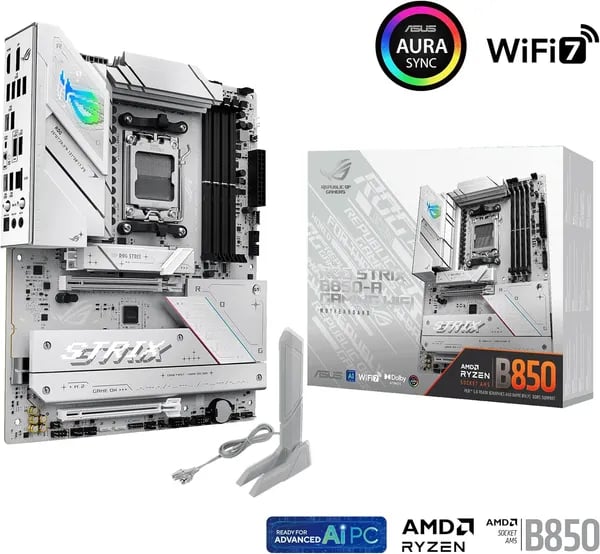
You’re standing at the parts list crossroads: want flagship features without paying flagship tax? I once swapped a 7-year-old board for a white ROG Strix and felt like my PC had learned a new language. This outline walks you through the ASUS ROG Strix B850-A Gaming WiFi with the kind of honest asides friends whisper about over coffee — the specs, quirks, and buying moves that matter.
Power, Cooling, and Overclocking — Why the 14+2+2 Matters
Power Phase Design: 14+2+2 Phases built for modern AMD Ryzen Processors
When you drop a high-core-count chip into an AM5 build, the motherboard’s VRM Power Design becomes the difference between “it runs” and “it stays stable under pressure.” The ROG Strix B850-A leans into that with a 14+2+2 Phases layout and 80A power stages. In simple terms, you’re getting more clean, steady power delivery for today’s AMD Ryzen Processors—including Ryzen 7000, 8000, and 9000 series—especially when you’re gaming for hours, streaming, or rendering.
That extra headroom matters most when your CPU boosts hard and fast. A stronger Power Phase Design helps reduce voltage droop and keeps power delivery smooth, which is exactly what you want if you’re running a flagship Ryzen CPU or enabling aggressive boost behavior.
VRM Heatsinks + premium chokes: keeping VRM temps in check
Power is only half the story—heat is the other half. ASUS pairs the VRM with thick metal VRM Heatsinks, premium alloy chokes, and durable capacitors so the board can hold performance without cooking itself. In real-world heavy loads, some reviews and user reports point to VRM temperatures hovering around ~60°C, which is a healthy range for sustained sessions.
This is the kind of cooling that helps you avoid the silent performance killer: VRM thermal stress. If your VRM runs too hot, your CPU may boost less, your system may become unstable, and long-term reliability can suffer. With the B850-A’s cooling approach, you’re set up for consistent performance instead of short bursts.
- Thick VRM Heatsinks help spread and dump heat faster.
- Alloy chokes improve efficiency and stability under load.
- 80A stages provide current capacity for demanding Ryzen boosts.
Overclocking Potential: DDR5-7600 proven, DDR5-8400 Support with tuning
If you like tweaking, this board gives you room to play. Builders have demonstrated DDR5-7600 memory speeds on similar ROG Strix setups, and the platform shows headroom toward DDR5-8400 Support (OC) with the right kit, BIOS settings, and a CPU memory controller that cooperates. You don’t need to chase extreme numbers to feel the benefit—tight, stable DDR5 tuning can improve frame-time consistency and overall system snap.
For a simple starting point in BIOS, you’ll typically enable your memory profile first, then fine-tune only if you want more:
Enable EXPO/XMP → test stability → adjust frequency/timings/voltage (optional)
"After 35 years building PCs, this class of ASUS boards still surprises me with stable VRMs and sensible cooling." — Expert Builder
| Feature | Why it matters to you |
|---|---|
| 14+2+2 Phases | More stable power delivery for high-end Ryzen boosts and heavy loads |
| 80A power stages | Extra current headroom for flagship CPUs and sustained performance |
| VRM Heatsinks | Helps keep VRM temps around ~60°C in demanding use cases |
| DDR5-8400 Support (OC) | Room to push memory beyond common speeds with careful tuning |
Storage, Expansion, and Ports — More M.2 Than You Might Expect
If you’re building on AM5 and you hate running out of fast storage, the ROG Strix B850-A feels made for you. The headline feature is the sheer number of M.2 Slots: you get four M.2 PCIe slots, giving you room for a big OS drive, a dedicated game library SSD, a scratch drive for editing, and still one left for later.
Four M.2 PCIe Slots (and Why That Matters)
ASUS positions this board as a high-speed storage playground, and it shows. With four M.2 bays, you can expand without touching SATA cables or sacrificing clean airflow. It’s also a smart move for the future: as PCIe 5.0 Support SSDs get cheaper and larger, you won’t feel boxed in.
Important note: some listings and user reports can be inconsistent about whether every M.2 slot runs at PCIe 5.0 speeds in all configurations. If you’re buying specifically for “max PCIe5 lanes on every slot,” verify your exact SKU in ASUS documentation before you commit.
DIY-friendly M.2 installs: Q-Latch Design + M.2 Q-Slide
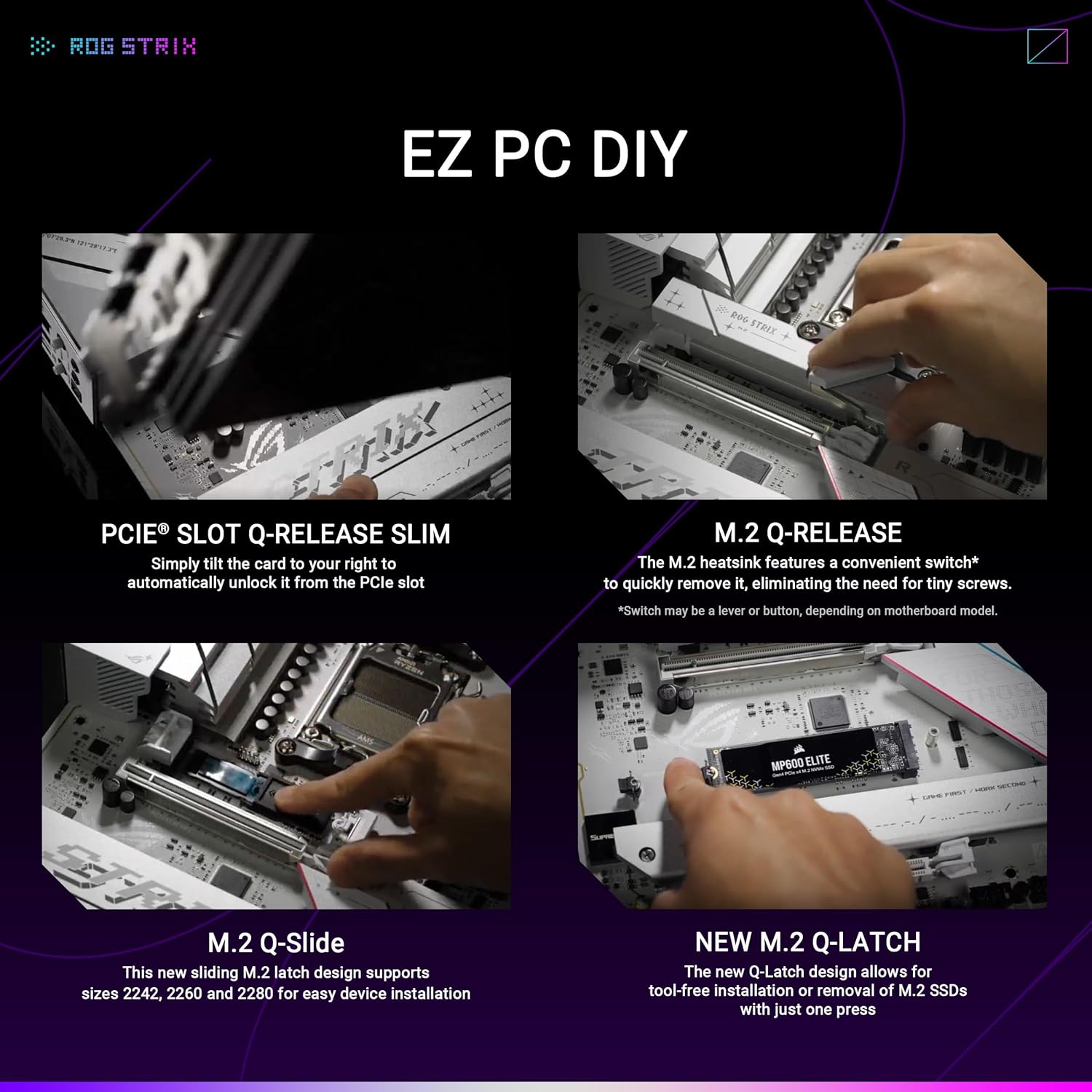
Installing drives is where this board saves you time. The Q-Latch Design (and ASUS’ tool-less M.2 approach like M.2 Q-Slide on supported slots) means less fumbling with tiny screws. That’s a big deal when you’re adding or swapping SSDs often.
"The layout is refreshingly DIY-friendly — Q-Release and Q-Latch save you time and thumb-scrapes." — DIY Tech Reviewer
PCIe 5.0 Slot Expansion Without the Headaches
Beyond storage, you also get modern expansion where it counts. The primary PCIe 5.0 Slot is built for today’s GPUs and tomorrow’s upgrades, and the board layout is clean enough that you can route cables and seat parts without fighting the heatsinks.
- Q-Release Slim helps you remove a graphics card without the usual knuckle-busting latch struggle.
- Heatsinks around key areas help keep high-speed parts stable during long gaming sessions.
Rear I/O and USB 3.2 Ports: Fast External Transfers
For peripherals and external storage, the rear I/O gives you a solid mix of USB 3.2 Ports. The standout is the USB 3.2 Gen 2x2 Type-C connection, delivering up to 20Gbps—perfect when you’re moving large game captures, project files, or backups to a fast external SSD.
One thing to keep in mind: some closely related models and user feedback mention the total USB count can feel a bit tight if you run lots of devices (stream deck, VR, multiple controllers, DAC, etc.). If you’re that kind of setup, plan on a powered hub.
Quick Recovery Controls: BIOS FlashBack Button + Clear CMOS
If you like to tweak, you’ll appreciate the safety nets. The BIOS FlashBack Button lets you update the BIOS without a CPU installed—handy for Ryzen upgrades. And a Clear CMOS button makes it easy to recover from an unstable memory setting without tearing your build apart.
Networking, Audio, and Smart Features — WiFi 7 Meets AI Tuning
WiFi 7 Support + Q-Antenna and 2.5GbE Ethernet for low-latency play
When you build on the ROG Strix B850-A, you’re not forced to choose between clean cable management and competitive ping. You get WiFi 7 Support with ASUS’ Q-Antenna for fast, stable wireless—plus 2.5GbE Ethernet when you want the most consistent wired connection for ranked matches and LAN-style reliability.
WiFi 7 is built for higher throughput and lower latency when your router and settings can take advantage of it. In real use, that means smoother game downloads, better performance in busy networks, and less “spike” risk when your home is full of devices. If you’re the type who streams, games, and runs Discord at the same time, the board’s networking stack is designed to keep things responsive.
Real-world caveat: a small number of users report occasional WiFi instability. Your best fix is simple: keep your BIOS and WiFi drivers/firmware updated, and place the Q-Antenna where it has a clear line to your router (not hidden behind a metal case panel).
AI Networking and AI Advisor Features that feel like a co-pilot
ASUS leans hard into “smart” tuning here, and it’s actually useful. AI Networking (via AI Networking II) helps you prioritize traffic so your game and stream don’t fight each other. You can set app priority, reduce background bandwidth hogs, and keep latency steadier during peak moments.
"AI Networking II really smoothed out my streaming priority during raids — less packet loss overall." — Streamer & Tech Enthusiast
You also get AI Advisor Features through ASUS AI Advisor, which is great when you want quick answers without digging through forums. It can guide you through setup choices and point you toward safer performance tweaks. Pair that with AEMP (ASUS Enhanced Memory Profile), and you have an easier path to strong RAM performance—especially if you’re trying to hit rated speeds without manual trial-and-error in BIOS.
- AI Advisor: guided help for setup and tuning decisions
- AI Networking II: traffic shaping and app prioritization for smoother gaming/streaming
- AEMP: memory tuning support to help stabilize and optimize RAM profiles
SupremeFX Audio + Armoury Crate control, with Aura Sync RGB style
For sound, the board uses SupremeFX Audio built around the ALC4080 codec, with Dolby Atmos support. In plain terms: you get clean output, strong positional cues in shooters, and a more polished experience for music and movies—especially with a good headset or powered speakers.
Software-wise, Armoury Crate centralizes driver updates, device settings, and system controls, so you’re not hunting across multiple pages after a fresh Windows install. And if your build is as much about looks as frames, Aura Sync Lighting (Aura Sync RGB) lets you match your motherboard glow to your GPU, RAM, fans, and even peripherals.
One thing to know: some users miss an optical S/PDIF output for older receivers. If you rely on optical audio, plan for USB audio or another workaround.
Real-World Feedback, Price Drops, and Buying Tips
Amazon Reviews Snapshot: Why the ROG Strix B850-A Keeps Showing Up in Builds
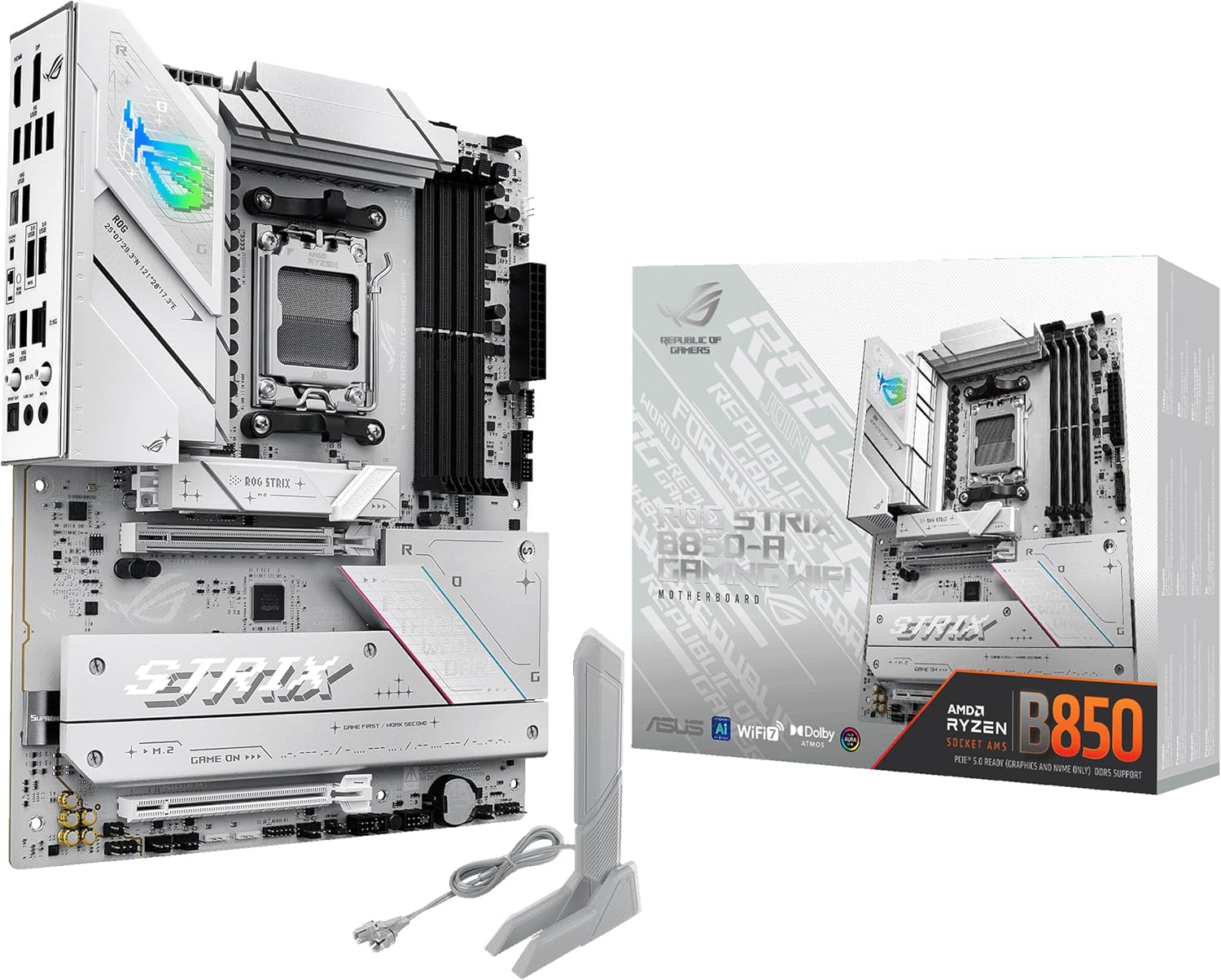
If you’re judging the ROG Strix B850-A by real buyer experience, the Amazon listing gives you a strong starting point. As of January 6, 2025, it was ranked #3 in Computer Motherboards, backed by a 4.4/5 average from 2,148 Amazon Reviews. You also get 9 high-resolution images on the listing, which helps you confirm the layout, heatsinks, and ports before you buy—especially useful if you’re matching a white-themed build.
Across customer reviews from the US, Canada, UAE, Sweden, Singapore, and Italy, the tone is consistent: you’re getting a polished AM5 platform board that feels premium for the money. People commonly call out easy setup, stable first boots, and strong performance with Ryzen 7000/8000/9000 chips. Networking is another highlight, with many buyers liking the mix of WiFi and 2.5GbE Ethernet for gaming and downloads on a Gaming WiFi Motherboard that’s meant to stay relevant for years.
"Smooth first boot and excellent out-of-box stability — one of the more polished mid-range AM5 boards I've used." — Hardware Reviewer
Price Drop Reality: Timing Your Purchase for Maximum Value
The biggest reason the ROG Strix B850-A feels like a smarter buy in 2025 is the Price Drop. It has been seen at $189.99, down from $289.99, which changes the value conversation fast—especially when you consider features like fast storage support and modern connectivity. If you’re building on a budget, it’s also worth checking like-new used listings, which can shave off more cost while still keeping you inside Amazon’s ecosystem.
Returns matter with core parts like a motherboard, and Amazon’s policy helps reduce risk: you typically get a 30-day return window, and some holiday purchases extend returns into 2026 for eligible orders. That extra time is useful if you’re buying parts slowly and testing your build later.
Buying Tips: Small Details That Save You Headaches
Before you click “Buy,” check a couple of real-world quirks buyers mention. First, if you’re ordering a white version, confirm the included WiFi antenna color—some users report a black antenna on white models, which may bother you if you care about a clean theme. Second, while most feedback is positive, a small number of owners mention rare WiFi instability; if you want maximum consistency for competitive play, plan to use 2.5GbE Ethernet when possible. Finally, if you rely on optical audio, note that some users wish for an S/PDIF port, so double-check your audio needs before committing.
If you’re ordering internationally, take a minute to verify the carrier’s reputation in your region. Most shipments arrive fine, but reviews show that delivery issues—while uncommon—are the kind of problem you want to avoid on a key AM5 component. With the current pricing and strong customer sentiment, the ROG Strix B850-A Gaming WiFi Motherboard lands as a practical, high-value choice—just make sure the small details match your build plan.



