.png&w=1280&q=75)
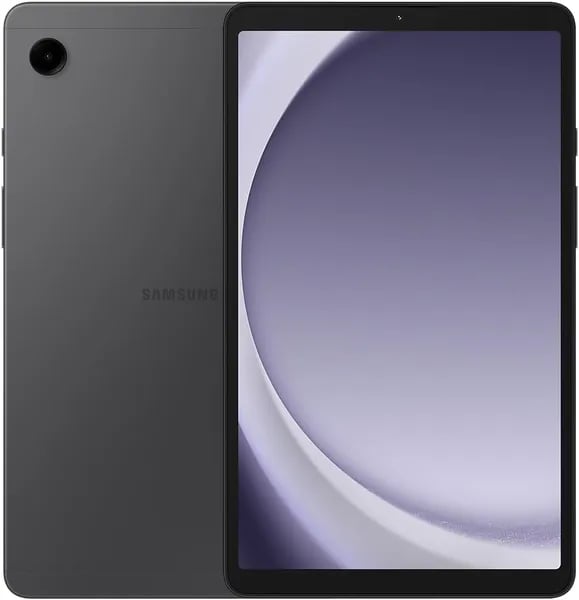
You know that feeling when a gadget surprises you for its price? I got curious about the Galaxy Tab A9 after seeing it tossed into a 'great value' list. I imagined a tiny, sluggish slate—but after a few days of streaming, sketching, and juggling tabs, I ended up with notes, screenshots, and one stubbornly positive opinion. This outline walks you through the parts that matter (and the small irritations you should know before you buy).
First Glance: What You’ll Notice Right Away
A compact 8.7-inch display that feels made for travel
The first thing you’ll notice on the galaxy tab a9 (SM-X110) is how easy it is to carry. Released on January 23, 2024, this is a small, grab-and-go tablet that won’t weigh down your bag. At just 1.12 pounds, it feels light enough for commuting, reading in bed, or pulling out in a café.
Up front, you get an 8.7-inch display with a 1340 x 800 resolution on a TFT LCD panel. With an 81.7% screen-to-body ratio, the screen looks nicely filled-in for the size, so it feels more “all screen” than you might expect at this price.
It’s a Wi‑Fi tablet, and setup is usually fast
This model is the SM-X110 International, WiFi only version, so you’ll be using it as a wi-fi tablet (no cellular). The upside is simple, stable connectivity on modern Wi‑Fi, and easy pairing if you already use Samsung devices.
One small surprise: because it’s an international model, your first boot may default to an overseas region (some users see places like the Middle East or South Africa). Don’t worry—your language, time zone, and Google apps can be changed during setup, and everything works normally once you adjust it.
What’s in the box (and what might be missing)
- Tablet
- USB‑C to USB‑C cable
- SIM tray tool
Some listings advertise a 15W wall charger bundle, but buyers report it isn’t always included—so check your seller’s exact description before you order.
Priya Kapoor, Tech Analyst: "For the price, the Galaxy Tab A9 nails the basics — light, smooth, and surprisingly capable for daily media."
Under the Hood: Performance, Storage and Everyday Use
Mediatek Helio G99 + 4GB RAM: Smooth for daily tasks
The Galaxy Tab A9 (SM-X110) runs on the mediatek helio g99, an octa-core chip clocked around 2.2GHz, paired with 4gb ram and a Mali-G57 MC2 GPU. In real life, that combo is a good match for a budget tablet: apps open quickly, scrolling stays steady, and you can comfortably jump between messages, email, YouTube, and a browser tab or two.
Alex Romero, Mobile Performance Reviewer: "The Helio G99 in a 4GB configuration keeps everyday apps responsive without overheating—impressive for a budget slate."
On strong 5 GHz WiFi, you can also handle light gaming and remote play. Users report solid results with Pokémon GO, Parsec, and RetroArch emulation—especially when you keep background apps in check.
64GB storage that doesn’t box you in (thanks, microSD support)
Out of the box, you get 64gb storage, which is fine for core apps and everyday photos. But if you download Netflix shows, save big PDF files, or hoard manga and comics, space can disappear fast.
- microSD support lets you expand storage up to 1TB
- Great for offline video, music libraries, and large game files
- A practical win over tablets stuck with low fixed storage
Developer options for people who like to tinker
If you’re more hands-on, the Tab A9 includes Android Developer options, including OEM Unlocking (where supported). That means you can explore deeper customization, testing tools, and advanced settings beyond the standard “family tablet” experience.
Screen, Sound and Media: Tiny Theater or Just OK?
Display specs: the 8.7-inch display is bright, not fancy
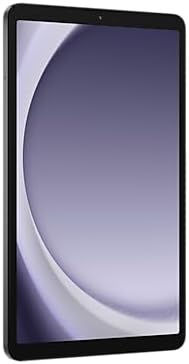
The Galaxy Tab A9 keeps things simple with an 8.7-inch display using a 1340 x 800 TFT LCD panel and an 81.7% screen-to-body ratio. In real use, that means you get acceptable brightness for daytime reading, scrolling, and casual streaming—something many budget tablets struggle with. The trade-off is sharpness and contrast: this isn’t OLED, and the modest resolution can look a bit soft on small text or detailed scenes.
If you’re coming from a larger tablet like the Tab A9+ (with an 11-inch screen and smoother refresh options), this one feels more “compact and practical” than “cinema.” Still, for manga panels, YouTube, and Netflix on the go, it does the job.
Hannah Lee, Multimedia Editor: "Expect clear audio and a perfectly fine screen for web comics and shows — just don't compare it to OLED flagships."
Sound: dual speakers that outperform expectations
Here’s the surprise: the dual 1.0W speakers with 3D sound punch above this price bracket. Recent user reviews (including Dec 2025) often call out the loudness and clarity, especially for video calls and casual streaming. You won’t get deep bass, but dialogue stays easy to hear without instantly reaching for headphones.
Media + camera features: simple, useful, and travel-friendly
For quick snaps, document scans, and video chats, the camera features feel “good enough” for everyday use—best in decent lighting. The real win is how the tablet supports your routine:
- Split-screen multitasking lets you watch a video on one side and take notes on the other.
- The compact size makes it easy to hold for long reading sessions.
- WiFi streaming stays smooth on a solid 5 GHz connection.
Battery Life & Charging: Practical Tips and a Small Caveat
Dependable battery life from a 5100 mAh cell
The Galaxy Tab A9 (SM-X110) runs a 5,100 mAh (Li-Po, non-removable) battery, and that size pairs well with its modest 8.7-inch TFT screen and budget-friendly hardware. In real use, you can expect dependable daily runtime for mixed activities—reading, browsing, video calls, and plenty of streaming. Light gaming and remote play sessions also feel practical without you constantly hunting for an outlet.
Daniel Ortega, Battery Tech Writer: "A 5100 mAh cell with conservative hardware can easily stretch to a day's use; just don't make a habit of deep discharges."
15W charging: fine, but not “fast” anymore
The tablet supports 15W charging over a wired connection. That’s adequate for topping up between classes, commutes, or couch sessions, but it won’t feel quick compared to newer phones and premium tablets. If you’re used to higher-watt charging, plan to plug in earlier rather than later—especially before travel days.
Small caveat: avoid full drains
One practical tip: try not to let the battery hit 0% and sit there. Some users report charging problems after a full battery drain. To play it safe, start charging around 15–20% and avoid leaving it fully depleted overnight.
- Enable Battery Saver for long reading sessions.
- Lower brightness when streaming indoors.
- Use WiFi efficiently (5 GHz when available) to reduce “searching” drain.
Charger bundle inconsistency: double-check the listing
Even if a bundle mentions a 15W wall charger, some buyers say it isn’t always included (seller listings can vary—examples mention checking sellers like lifeline786). Your box should include the tablet and a USB-C to USB-C cable, so confirm whether the wall adapter is truly part of your order.
International Quirks, Compatibility and Real Buyer Stories
International firmware: a small “wait, what?” moment
Because this galaxy tab a9 is an International Version, your first boot may default to a non‑US region (some buyers mention Middle East or South Africa). Don’t panic—once you pick your language, set your time zone, and sign into Google, your apps and services work normally. If you like to tinker, you’ll also find Developer options available (including OEM unlocking on some units), which tech-savvy owners appreciate.
Compatibility basics: it’s wi-fi only (by design)
This model is wi-fi only, so there’s no built-in cellular for SIM data. The upside is simple setup and solid wireless performance with 802.11ac—great for streaming, video calls, and quick file sharing inside Samsung’s ecosystem. For a family tablet, that “Wi‑Fi at home” focus can be a plus: fewer carrier hassles, fewer surprise fees.
Real buyer stories: what people actually praise (and warn about)
Across 1,093+ reviews, the tablet holds a 4.3 average rating, which is strong for the budget category. Feedback as recent as December 2025 often highlights easy setup, surprisingly good sound, bright-enough screen, and smooth pairing with Galaxy earbuds.
- Families like it for reading, homework apps, and travel entertainment.
- Travelers mention the compact size and reliable Wi‑Fi on 5 GHz networks.
- International buyers sometimes report pricey returns—buyers in Mexico, for example, have noted expensive shipping back to the U.S.
Before you buy: seller details matter
International listings can vary from $109.99–$112.39, and renewed options may save up to $7.39. Also, some buyers report the 15W charger isn’t always included despite bundle wording—so check the exact seller listing and return policy.
Lena Martinez, Consumer Tech Blogger: “The Tab A9 hits the sweet spot for families who want functionality without the sticker shock.”

Value Check: Alternatives, Trade-offs, and My Buying Tip
Price vs. the other “budget tablet” picks
The sm-x110 model is hard to ignore because it often lands around $109.99–$112.39 for a new international listing. At that price, you’re getting Samsung’s cleaner software feel, solid Wi‑Fi, and microSD expansion—things many bargain brands still mess up. You’ll see cheaper options from CHUWI or DigiLand, but they usually trade away long-term smoothness, updates, and overall polish.
If you can spend more, the tab a9+ is the “step-up” choice: an 11-inch 90Hz screen, a Snapdragon 695, and a bigger 7,040 mAh battery. It’s better for split-screen and longer viewing, but it also costs more—so the value depends on whether you’ll actually use that extra screen and speed.
The trade-offs you should accept (or avoid)
This is not a premium tablet, and it doesn’t pretend to be. You’re living with a basic TFT display (no OLED and a 720p-ish sharpness), no S Pen support, and limited “desktop-style” use: no DeX and USB‑C 2.0 means you shouldn’t buy it expecting serious external monitor workflows. Also remember it’s Wi‑Fi only, and international SKUs can be a gamble for USA/Canada warranty or region support—always read the listing details.
Mark Eldridge, Gadget Columnist: "If you accept modest specs, the Tab A9 offers remarkable everyday value at just above $100."
My buying tip
If you want a simple Samsung experience for reading, streaming, kids’ apps, and light work, the Tab A9 is a smart buy—especially with expandable storage. Buy new from a reputable seller and confirm what’s included (some “bundle” listings don’t ship the 15W charger). If you go renewed, stick to verified refurbishers so you don’t lose your savings on returns or battery issues.



