.png&w=1280&q=75)
You know that jittery moment in a hotel lobby when the Wi‑Fi sign looks promising but your video call keeps dropping? I once missed a punchline during a family Zoom because the hotel's network was a digital gremlin. That taught me to never rely on public hotspots—and why a travel router became my tiny, reliable travel buddy. In this post you'll get a friendly, slightly opinionated tour through the GL.iNet Slate 7 and other travel routers that actually make on‑the‑road internet feel civilized.
Why the GL.iNet Slate 7 Feels Like a Game-Changer
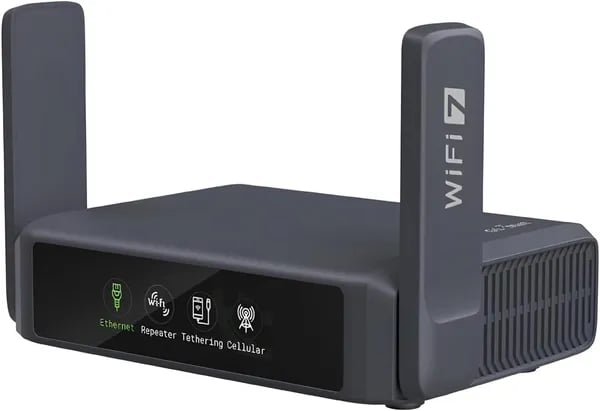
If you want a Portable Wi-Fi Router that doesn’t feel like a compromise, the GL.iNet Slate 7 is the one that changes your expectations. Released on May 1, 2025, it’s built like a flagship—fast enough for modern travel, secure enough for public Wi‑Fi, and simple enough that you don’t need to be a network expert to use it.
Wi‑Fi 7 Support that actually helps in real travel
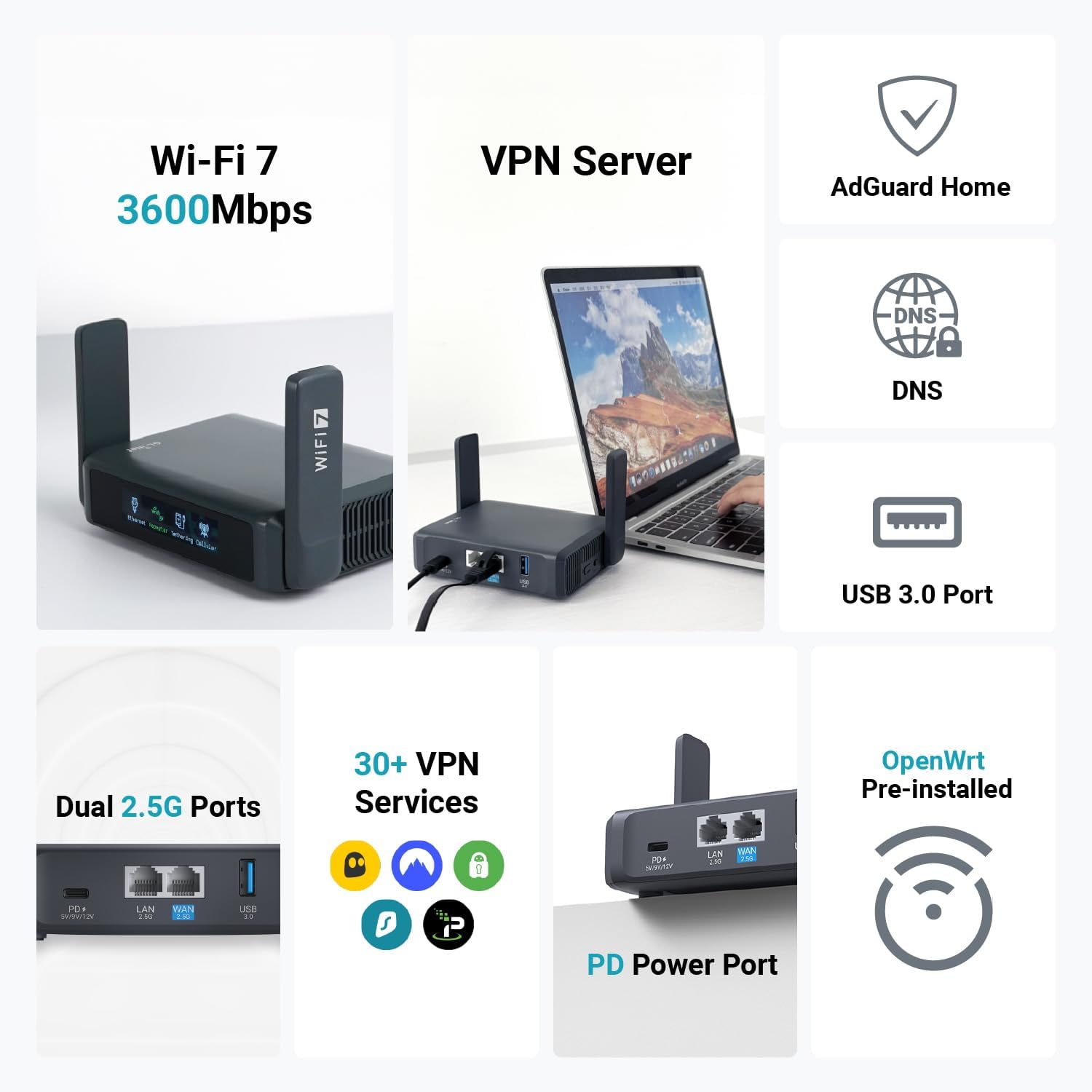
The Slate 7 brings dual-band Wi‑Fi 7 with speeds up to 2,882 Mbps on 5GHz, which you’ll notice when you’re streaming in high quality, hopping on video calls, or sharing one connection across multiple devices. It also supports MLO (Multi-Link Operation), which helps it stay responsive in high-density places like hotels, conferences, and busy airports—where weaker travel routers often choke.
Real portability, plus “why doesn’t every router have this?” hardware
It’s genuinely travel-friendly at 3.5 × 1.3 × 5.1 inches and 10.6 oz, but it still packs serious ports for flexible setups:
- Dual 2.5G Ethernet ports for fast wired hotel/RV connections or sharing to a laptop/console
- USB 3.0 for extra travel use cases (like tethering or add-ons)
VPN Support Features + built-in security you can trust
Public Wi‑Fi is risky, so the Slate 7 bakes in WPA3, DNS over HTTPS/TLS, and IPv6. It also comes preloaded with OpenVPN and WireGuard (works with 30+ VPN services), so you can protect everything you connect—phone, laptop, streaming stick—at once.
And the VPN speeds are practical for real life: OpenVPN up to ~100 Mbps and WireGuard up to ~540 Mbps, which matters when you’re uploading files or streaming while connected to a VPN.
Touchscreen UX that makes advanced settings feel easy
The touchscreen is the difference-maker: you can check real-time speeds, switch VPNs, and confirm status using color-coded network indicators. Setup is fast with QR code scanning, so you spend less time troubleshooting and more time online.
OpenWRT Firmware for tinkerers (without locking out beginners)
Under the hood, you get OpenWrt 23.05 (Kernel 5.4.213) plus 512MB storage for plugins—ideal if you like deeper control via SSH and custom packages.
Alex Torrence, Network Engineer: "The Slate 7 blends speed and security in a way most portable routers haven't managed — it's a rare, practical leap."
It’s also well-received in the real world, with a 4.6-star average across 808 Amazon reviews, where travelers consistently praise its build quality and support.
Alternatives: Pick the Router That Matches Your Travel Style
The Slate 7 is a top pick in the Best Travel Routers list for 2025, but your “best” depends on how you travel. Some trips need a simple Budget Travel Router; others demand 5G Cellular Speeds, multi-gig ports, or a router that can pull double duty at home.
Lisa Moreno, Travel Tech Writer: "If you travel for work, prioritize VPN speed and multi-gig ports; for weekend trips, a compact budget router will likely suffice."
Budget-minded picks: solid security for less
If you mainly want safer hotel Wi‑Fi, easy VPN use, and a small device that disappears into your bag, these are strong value options:
- GL-MT3000 (Beryl AX) ($69.99–$86.99): Wi‑Fi 6 performance with traveler-friendly VPN support—great when you want speed without paying Wi‑Fi 7 prices.
- GL-SFT1200 (Opal): a simple, budget-focused choice for basic travel sharing and protection when you don’t need multi-gig ports.
Trade-off: budget models typically skip premium extras like Wi‑Fi 7 throughput and multi-gig Ethernet, and many travel routers still don’t include a built-in battery.
Cellular and power users: pay more, get true mobility
If you work from anywhere—or you’re tired of unreliable hotel networks—cellular-integrated routers cost more but add serious flexibility.
- NETGEAR Nighthawk M6 Pro ($699.99): built for 5G Cellular Speeds (including 5G mmWave) with Wi‑Fi 6E—ideal for airports, events, and backup internet.
- SIMO Solis Pro ($269.99–$359): a smart pick if you like the idea of built-in data plans for global travel.
Wi‑Fi 6/6E and home crossover: travel now, game later
- GL-AXT1800 (Slate AX) ($92.54–$109.99): a balanced Wi‑Fi 6 travel router for frequent trips and VPN use.
- GL-BE9300 (Flint 3) ($152.99–$189.99): a Wi‑Fi 7 “anchor” for home, business, or gaming—great if you want one router to cover travel setups and faster home networks.
Also worth a look: TP-Link options
The TP-Link BE3600 travel router ($99.99) is a strong alternative, and many travelers also compare it to models like the TP-Link TL-WR3002X when shopping for compact Wi‑Fi 6-class gear.
Quick tip: Add a $16.99 carrying case to protect ports and antennas during transit.
What You Really Need to Check Before Buying
Security first: WPA3 + private DNS + built-in VPN
If you’ll use hotel, airport, or cruise Wi‑Fi, security isn’t optional. Look for WPA3 (stronger Wi‑Fi encryption), plus DNS over HTTPS/TLS so your browsing requests aren’t easy to snoop on. Next, confirm the router has a native VPN client—not just “VPN pass-through.” Models like the GL.iNet Slate 7 ship with OpenVPN and WireGuard, so you can protect every device you connect without installing apps everywhere.
Ports and expandability: Multi-Gig Ports + USB 3.0
In 2025, many travel routers push Wi‑Fi 6/7 speeds, but your real-world experience often comes down to ports. If you want “home-like” performance in a hotel room, prioritize Multi-Gig Ports (2.5Gbps Ethernet). The Slate 7 includes dual 2.5G ports, which is great for fast wired backhaul or sharing a high-speed connection with a laptop.
Also check for USB 3.0. On the Slate 7, it’s useful for storage sharing or modem tethering when you need internet from a phone or USB modem.
Cellular is a common gap: many travel routers don’t include a SIM slot, and “cellular support” may mean external tethering only. If you need built-in 5G, you may be looking at a dedicated hotspot instead.
Power and portability: USB-C Charging matters more than you think
Many travel routers still don’t have a built-in battery. That’s normal—just plan for it. Make sure you can power it with USB-C Charging (or at least a travel-friendly adapter), and decide if you’ll run it from a wall plug, laptop, or power bank on long-haul days.
OpenWRT Firmware: value that lasts
If you like plugins, ad blocking, scripts, or advanced routing, check for OpenWRT Firmware support. Slate 7 runs OpenWrt 23.05 with Kernel 5.4.213, which can extend the router’s life well beyond the first year.
Marcus Li, IT Consultant: "Buy the feature set you’ll actually use — a shiny spec sheet is great, but if you never need 2.5Gbps, a simpler router will save weight and money."
Quick checklist (Travel Router Pros use)
- Security: WPA3 + DNS over HTTPS/TLS
- VPN: Built-in OpenVPN/WireGuard client
- Wi-Fi 6 Performance (or Wi‑Fi 7 if you’ll pay more)
- Multi-Gig Ports: 2.5Gbps Ethernet if you’ll wire in
- USB 3.0: storage or modem tethering
- Power: USB-C Charging + plan for no battery
- OpenWRT Firmware: for plugins and flexibility

Real-World Scenarios and Weird Little Tips (a.k.a. Things I Wish I Knew)
Specs are fun, but on the road you’ll care more about stable connections, VPN Support Features, and not snapping a port in your bag. That’s why a Portable Wi‑Fi Router like the GL.iNet Slate 7 (over 3,000 units sold, Top-10 Amazon “Computer Routers”) feels less like a gadget and more like travel insurance.
Hotels: Beat the Captive Portal (Bridge/Repeat Mode)
Hotel Wi‑Fi logins are the #1 “why won’t this work?” moment. Use bridge or repeat mode so your router handles the captive portal once, then all your devices connect to your private network. On Slate 7, the QR code setup speeds this up—scan, join, done.
- Tip: Name your travel network the same SSID as home. Your phone and laptop auto-connect.
- Port protection tip: Don’t leave Ethernet cables dangling—one tug can stress the jack.
RVs & Campgrounds: Stability First, Then Speed
In campgrounds, raw speed matters less than staying connected when signals bounce. Prioritize placement (near a window) and use VPN cascading so you can still reach local devices (like a printer/NAS) while your traffic stays protected.
Anecdote: I once used a Slate 7-like setup to stream a live class from an RV park while a storm knocked out a nearby tower. The connection wasn’t “fast,” but it was steady—and the VPN kept it secure and surprisingly smooth.
Planes & Cruise Ships: USB Power + WireGuard = Fewer Buffers
On planes and ships, space and power are everything. Pick a router with USB power and fast VPN options like WireGuard so streaming is more feasible when bandwidth is tight. If your plan includes a Travel Router Battery, test it at home first—some banks throttle or shut off on low draw.
Weird Little Tips That Save Your Router
- Pack a $16.99 carrying case to protect ports and the touchscreen (seriously worth it).
- Use a short USB-C cable to reduce strain on the power port.
- Durable Travel Design isn’t just marketing—your bag is basically a vibration test lab.
Nina Patel, Digital Nomad: “A dependable travel router changed how I book last-minute coworking spots — I worry less about flaky Wi‑Fi and more about desk selection.”
Wild card: At a festival, you can realistically run Slate 7 off a portable solar charger—just plan power carefully and keep expectations realistic when clouds roll in.
Wild Card: A Short Thought Experiment (What If?)
What if you could rent a Slate 7 at airports worldwide?
Picture this: you land, walk past baggage claim, and there’s a small kiosk that lets you rent a GL.iNet Slate 7 for 24 hours—like grabbing a power bank. You scan a QR code, tap the touchscreen, and your phone, laptop, and tablet instantly join your own private network. For business travelers, that could change the rhythm of work trips. Instead of gambling on hotel Wi-Fi or tethering all day, you’d carry a consistent setup from airport lounge to taxi to conference hotel—fast, familiar, and locked down with WPA3 and built-in OpenVPN/WireGuard.
In that world, Travel Router 2025 shopping looks different. Frequent flyers may still buy the Slate 7 because they want it always in their bag, but occasional travelers might just rent “the best” for the days they need it. As Owen Reyes, Product Strategist, puts it:
“Hardware-as-a-service for travel routers could reshape who buys versus rents — particularly for infrequent travelers.”
Your Portable Wi-Fi Router as a tiny embassy
Here’s a simple way to think about why the Best Travel Routers matter: a travel router is a tiny embassy for your devices. It negotiates safe passage and speaks the local network’s language so you don’t have to. The hotel Wi-Fi, the RV park login page, the cruise ship network—those are “foreign countries.” Your Portable Wi-Fi Router stands between them and your devices, keeping your traffic encrypted, managing DNS protections like DNS over HTTPS/TLS, and letting you switch VPNs with a tap.
Subscription travel networking: convenience vs. control
If rentals became normal, you might subscribe to “secure connectivity” the same way you subscribe to streaming. But the Slate 7’s appeal is control: dual-band Wi-Fi 7, dual 2.5G Ethernet, USB 3.0, and OpenWrt flexibility—features that feel personal once you’ve set them up. So here’s the question to end on: would you rather own your trusted router, or rent one on-demand and travel lighter? Either way, the future of Best Travel Routers may be less about one device—and more about how you want connectivity to follow you.



