.png&w=1280&q=75)
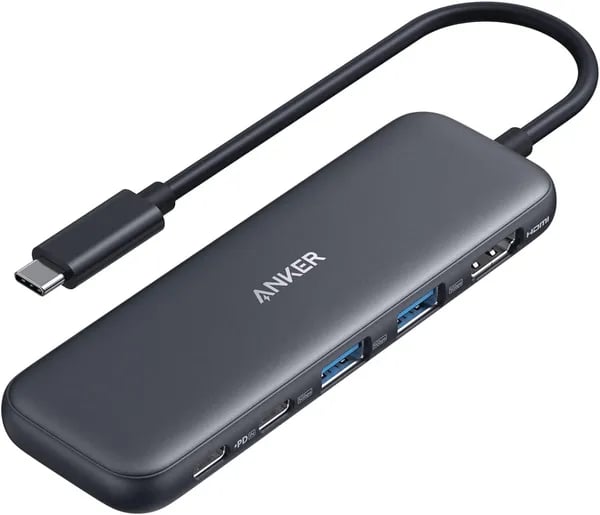
You know that moment: you reach for your charger and realize your laptop’s lone USB‑C port is already hosting a monitor, SSD and mouse. Been there? You can almost feel the panic. This little Anker 5‑in‑1 USB C Hub is the kind of gadget that quietly rescues you—unfussy, light, and surprisingly powerful. I first grabbed one before a weeklong co‑working trip and it saved me from carting a bulky dock; you might find it does the same.
Why this tiny hub makes a big difference
Plug-and-play simplicity with a MacBook Compatible setup
When your laptop only has a couple of ports, a reliable USB C Hub stops being “nice to have” and becomes essential. The Anker USB-C Hub keeps things simple: you plug it in and your connections show up right away—no drivers, no apps, no troubleshooting marathon. That means you can jump from a café to a meeting room and instantly connect an HDMI display, a keyboard, a mouse, or an SSD.
It’s built for the devices you actually use, including MacBook Pro/Air, Dell laptops, the ROG ALLY, and even iPad Air—so you’re not buying a hub that only works on one machine.
A true Travel-Friendly Hub you’ll actually carry
Some “portable” docks are basically bricks. This 5-in-1 USB-C Hub is the opposite. At just 4.78 x 1.59 x 0.45 inches and 1.44 oz, it slips into a laptop sleeve, tech pouch, or even a pocket without adding bulk. You can keep your bag lighter and your desk cleaner, while still having the ports you need for real work.
Tom Richardson, PackHacker: "Small hubs that actually work are rare—this one hits the sweet spot for price and dependability."
Big value for a small price
This is where the Anker hub really stands out. You’re getting a well-known brand at a budget-friendly price: $18.99 new, or $16.98 “Used - Like New” via AnkerDirect. You also get buyer-friendly perks like FREE 30-day returns and fast shipping—Prime delivery can be as soon as Friday, January 9 (timing depends on your location).
Peace of mind that cheaper hubs don’t match
Many low-cost hubs feel like a gamble. With Anker, you get an 18-month warranty and a strong reputation for after-sales support. If you rely on your hub for charging, displays, and daily accessories, that extra backup matters just as much as the ports.
- Instant connectivity: no drivers, no setup
- Easy to pack: 1.44 oz, under 5 inches long
- Low risk: 30-day returns + solid warranty
Hardware & Port Configuration — what you get
The Anker 5-in-1 hub keeps things simple: one compact block that covers video, data, and charging without turning your bag into a cable mess. At just 4.78 x 1.59 x 0.45 inches and 1.44 oz, you can leave it plugged in at your desk or toss it in a sleeve and forget it’s there.
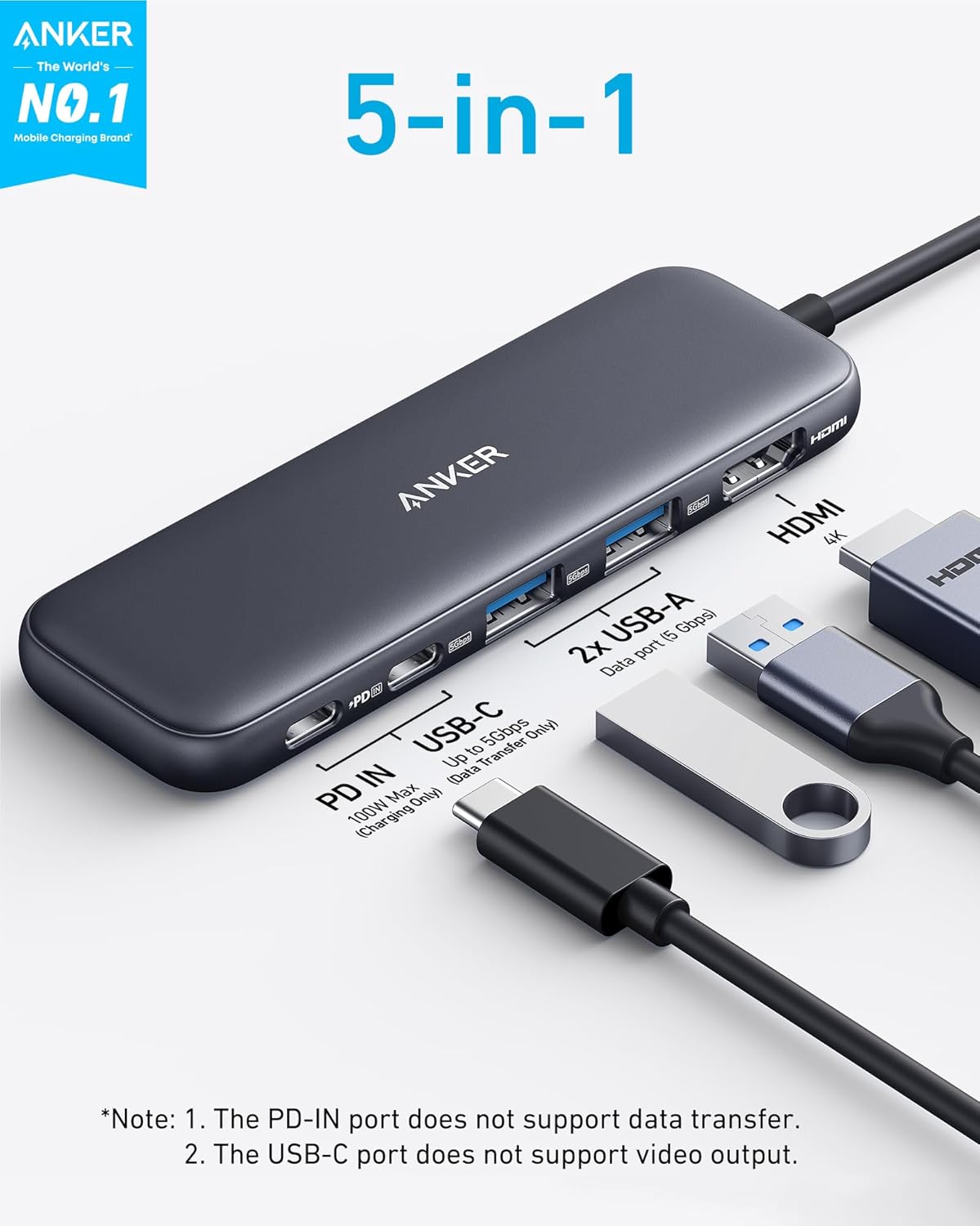
Port Configuration: 4K HDMI, USB-A Ports, USB-C Data Port, Power Delivery
You’re getting a balanced Anker-style lineup designed for everyday laptop setups—fast 5Gbps transfers, a single display output, and pass-through charging.
| Port | What it does | Key spec |
|---|---|---|
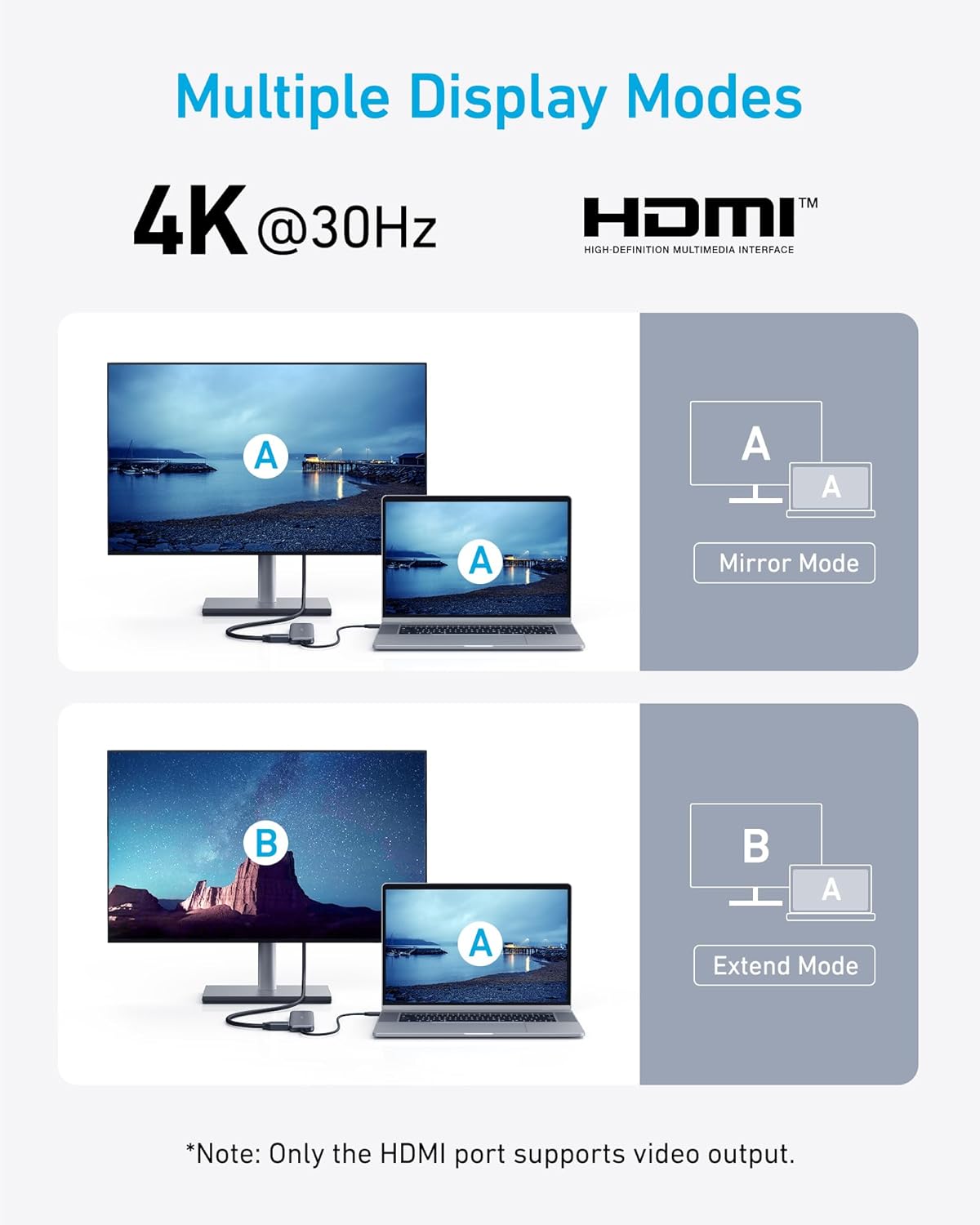
| 4K HDMI | Connect an external monitor/TV | Up to 4K (your device may output 30Hz or 60Hz) |
| USB-C Data Port | Plug in USB-C drives, adapters, or peripherals | 5Gbps |
| 2× USB-A Ports | Connect mouse, keyboard, flash drive, SSD enclosure | USB 3.0, 5Gbps each |
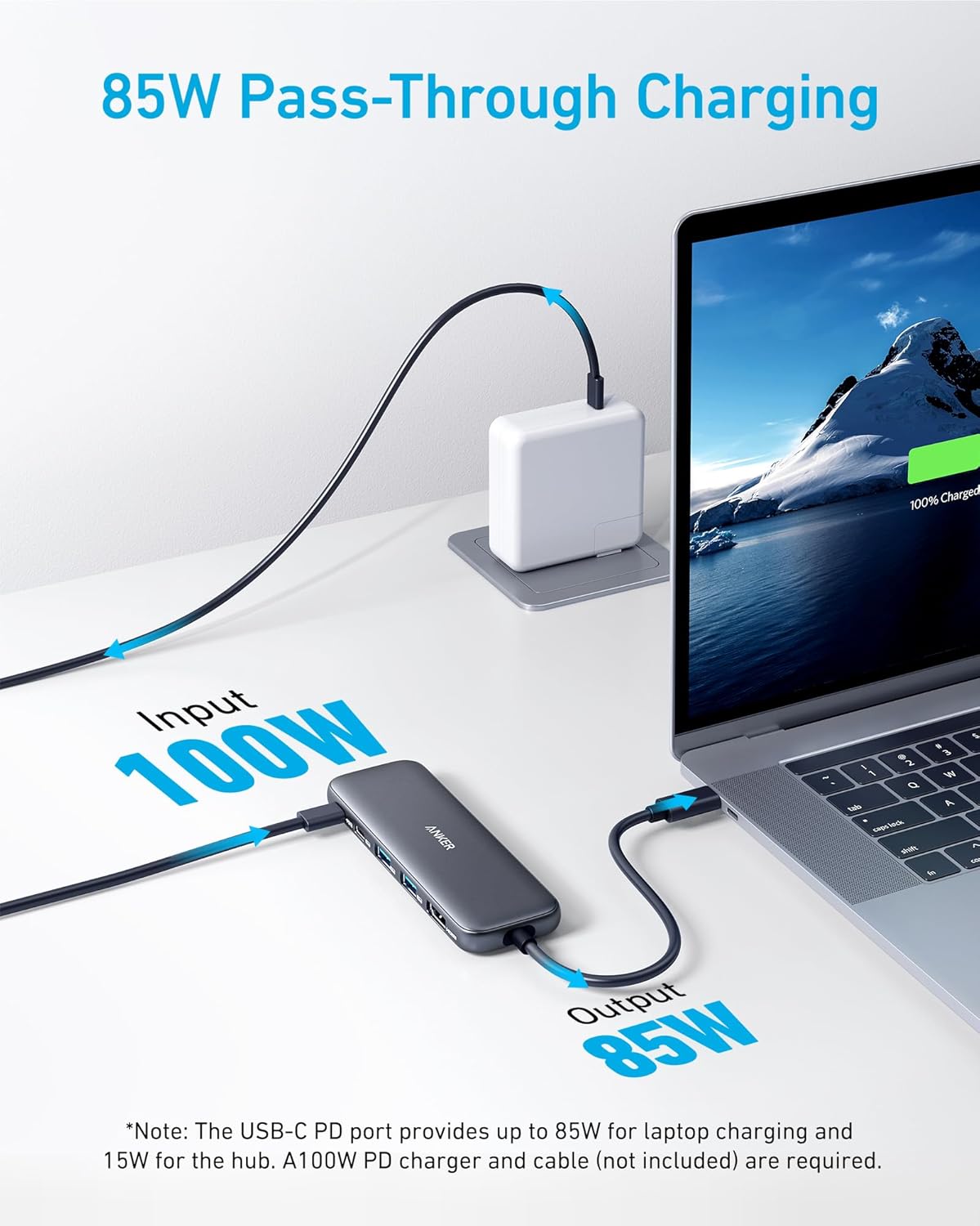
| USB-C Power Delivery (PD-IN) | Charge your laptop through the hub | 100W input, up to 85W pass-through |
Compatibility notes (what your laptop must support)
To use everything, your host USB-C port needs DP Alt Mode (for HDMI video) and Power Delivery (for charging). Not every USB-C port on every laptop behaves the same, so if your HDMI doesn’t light up, try a different USB-C port on your device.
Emily Carter, MacBook Specialist: "You get the right mix of ports without the bulk—just be sure your laptop’s USB‑C supports DP Alt Mode for video out."
Practical caveats you should know
- Power Delivery reality check: to reach the advertised up to 85W pass-through, you’ll typically need a strong wall charger (often 100W). Lower-watt chargers will charge, just slower.
- PD-IN is charging-only: the USB-C charging port won’t carry data or audio.
- Linux/HDMI quirks: some features may not be supported on Linux, and certain AV receivers can be picky—HDMI may work best when the hub is powered and connected to the correct USB-C port.
Real-world performance, reviews & odd little quirks
What reviews say about this USB C Hub (and why it matters)
When you’re buying a small accessory that sits between your laptop and everything else, consistency matters more than flashy specs. That’s where this USB C Hub stands out: it has 15,831+ reviews with a 4.4-star average. That kind of review volume usually means the product works for a wide range of people—not just a few lucky buyers.
It also shows strong “real-world trust” signals: #2 in Computers & Accessories, #1 in Laptop Docking Stations, Amazon’s Choice, and 10K+ bought. Reviewers often mention solid build quality, stable connections, and a setup that’s truly plug-and-play.
Marcus Lee, IT Consultant: "For the price, the reliability and speed are impressive—especially if you need a second monitor and quick SSD access on the go."
Data Transfer Speed & File Transfer in daily use
Specs can promise “up to 5Gbps,” but what you feel day to day is actual Data Transfer Speed. Users report around ~380 MB/s when moving files to an SSD—fast enough that large File Transfer jobs (photos, video clips, project folders) don’t turn into coffee breaks.
- Two USB-A 3.0 ports help you keep a mouse/keyboard connected while copying files.
- USB-C data port is handy for modern drives and adapters (note: it’s data, not charging).
External Monitor setups with 4K HDMI (mostly smooth)
For an External Monitor, the 4K HDMI port is the headline feature. Many users report clean output for work and travel setups—especially with MacBook Pro, M4 MacBook Air, iPad Air, and even the ROG ALLY for on-the-go gaming.
Odd little quirk: some AV receiver chains can be picky. If HDMI doesn’t show up through a receiver, you may need to ensure the hub is properly powered (use the USB-C PD-IN port) and that you’re plugged into a USB-C port that supports DP Alt Mode.
Compatibility notes you should know
- Works great across reports from the U.S., France, Ireland, Sweden, Poland, and the Netherlands.
- Linux isn’t supported, so plan accordingly.
- The charging USB-C port is for power only—no data/audio through that port.
Compare & choose: where Anker sits among competitors
When you shop for USB C Hubs, you’ll notice a big spread in price and features—roughly $18.99 to $149.99. The Anker 5-in-1 lands in the sweet spot: not the absolute cheapest, but far from a pricey Docking Station USB-C setup. You get the essentials (4K HDMI, 5Gbps USB-A/USB-C, and 100W PD-IN with up to 85W pass-through) in a tiny, travel-ready body.
Cheap vs feature-rich: what competitors offer
| Model | Ports/Focus | Price | Rating |
|---|---|---|---|
| Anker 5-in-1 | Core ports + 4K HDMI + PD | $18.99 | 4.4★ |
| LUKCOZMO 7-in-1 | More ports for less money | ≈$12.99 | 4.5★ |
| intpw P9 9-in-1 | Extra expansion, bigger footprint | $31.99–$36.99 | 4.5★ |
| ABLEWE (Ethernet models) | Adds Gigabit Ethernet + extras | Varies | Varies |
If you’re tempted by ultra-budget options like LUKCOZMO, you may save a few dollars, but you’re often trading away brand consistency and support. Step up to intpw or ABLEWE and you’ll usually gain more ports—sometimes Ethernet—at the cost of size and price.
When Anker is the simplest decision (and why it’s among the Most Recommended Hubs)
- You want the best price-performance ratio for daily work: one display, fast peripherals, and charging.
- You value trust and support: Anker’s 18-month warranty and strong track record matter when you rely on your hub.
- You want compact: it’s easy to toss in your bag and keep your desk clean.
Daniel Park, Product Reviewer: "If you rarely need Ethernet or multiple SD slots, the Anker 5‑in‑1 is the simplest decision—small, fast and usually cheaper than bigger docks."
When to upgrade to a 14-in-1 Hub or a full Docking Station USB-C
Choose a higher-end hub if you need Gigabit Ethernet, SD/microSD readers, 10Gbps transfers, or multiple monitors (like dual/triple displays). That’s where a 14-in-1 Hub or a true docking station earns its higher price.
Wild card: a travel‑packed 48‑hour setup & a playful analogy
Picture this: you’ve got a 48-hour conference sprint—hotel check-in, a client meetup, then a last-minute presentation. You need your 85W Laptop charging, an External Monitor for a clean dual-screen workflow, and fast access to files on an SSD. This is where the Anker USB C Hub earns its keep as a true Travel-Friendly Hub: you plug in once and keep moving, without stuffing your bag with extra adapters.
Your “PortableDocking” moment: one hub, three jobs
In a real setup, you connect HDMI to a conference room display (up to 4K), plug your SSD into a USB-A 3.0 port for quick transfers (users report around ~380 MB/s), and keep power flowing through USB-C PD pass-through (supports up to 85W). That means you can present, charge, and pull files at the same time—no juggling cables while someone waits for your slides to load.
Analogy time: the Swiss Army knife for ports
Think of this hub like a Swiss Army knife—small, simple, and surprisingly capable when you need it most. It’s light enough to forget in your pocket, but it can save the day when your laptop only has USB-C and the room only has HDMI.
Amelia Rodriguez, Digital Nomad: "When you’re moving between coffee shops and client sites, a tiny hub like this is the difference between a calm setup and a tangled mess."
Quick packing tip (and a smart test before you go)
Choose a color that matches how you travel: Grey or Black hides scuffs best for heavy use, while Blue or Green is easier to spot in a messy bag (and White looks clean if your gear stays clean). One practical aside: test HDMI with your specific TV, projector, or AV receiver at home before you leave—some setups can be picky unless everything is powered correctly. Do that once, and this compact hub becomes your reliable, grab-and-go PortableDocking finish to every short trip.



